By Francisco Mastromarino, Founder, Quick.bot · July 17, 2026
Self-Hosted Typebot: What Does It Really Cost Before You Deploy?
Key takeaways
- Self-hosted Typebot is free to license (open source) but not free to run: a production deploy also needs a VPS, S3-compatible object storage, an SMTP provider, a PostgreSQL database, backups and TLS.
- Typebot’s own docs are explicit that the operator pays for the infrastructure. The recurring cost most teams underestimate is engineering time for updates and incidents, not the hardware.
- Typebot self-hosting runs 2 core services (the builder and the viewer) plus a Postgres database, typically via Docker.
- Self-hosted Typebot has no native shared inbox, so live human handoff usually means bolting on a second tool, a whole second stack to host and secure.
- Quick.Bot is a managed alternative that folds server, storage, email, backups and a native shared inbox into one plan, with uptime, patching and on-call handled for you.
Self-hosted vs managed at a glance
| Cost area | Self-hosted Typebot | Managed cloud (e.g. Quick.Bot) |
|---|---|---|
| Software license | ✅ Free (open source) | ✅ Included in plan |
| Server / VPS | ⚠️ You provision and pay | ✅ Included |
| Object storage (files, images) | ⚠️ S3 or MinIO to configure | ✅ Included |
| SMTP for emails | ⚠️ Bring your own provider | ✅ Included |
| Database + backups | ⚠️ Your responsibility | ✅ Managed |
| TLS / domain / uptime | ⚠️ You maintain | ✅ Handled for you |
| Updates & security patches | ⚠️ Manual, ongoing | ✅ Automatic |
| Native shared inbox & handoff | ❌ Not included | ✅ Built in |
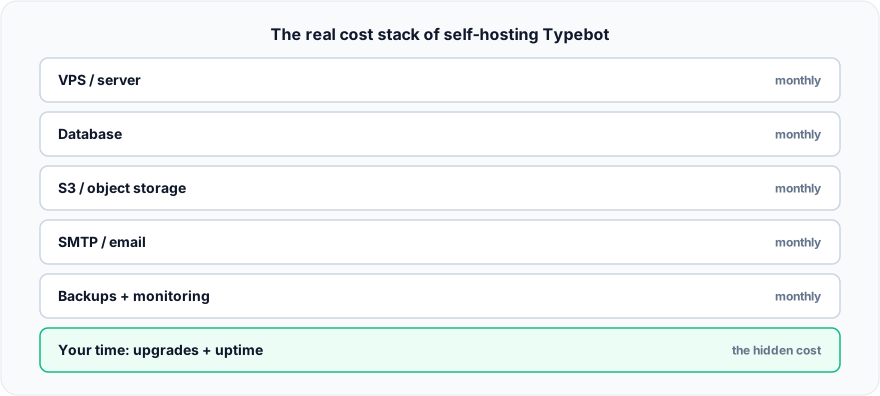
Figure: The real cost stack of self-hosting Typebot.
What is self-hosted Typebot?
Typebot is an open-source builder for conversational forms and chatbots. Self-hosting means running its two main services (the builder and the viewer) on infrastructure you control, usually via Docker, alongside a PostgreSQL database. Because the code is open source, there is no per-seat license fee, which is the main reason teams choose this path.
Is self-hosting Typebot actually free?
No. The license is free, but a working deployment carries recurring costs. Typebot’s own self-hosting documentation is direct about this. As the Typebot docs put it:
“You need to pay for your server, your database, your S3 storage, backups and whatever other cost there is associated with running the infrastructure.”
That single sentence names four cost lines before you count a minute of engineering time. Here is the checklist most teams discover only after they start.
What infrastructure does a self-hosted Typebot deploy need?
At minimum a VPS, a PostgreSQL database, S3-compatible object storage, an SMTP provider, TLS certificates and a backup routine. Each is a separate decision with its own bill or its own maintenance burden. The seven items below are where the money and hours actually go.
1. The server (VPS)
Typebot needs a machine to run on. A single-flow project can start on a modest VPS, but memory use climbs with concurrent chats and media. Budget for CPU, RAM and bandwidth headroom, plus a second environment if you want staging. Typebot’s own docs list Vercel as a supported target, and there the numbers are public: the Hobby plan is free but not licensed for commercial use, so a business starts on Pro at $20/user/month (with $20 of usage credit included, then overage: $0.15/GB transfer, $0.128/hour active CPU). Verified August 2026.
2. Object storage
File and image uploads are not stored in the database. They need S3-compatible object storage. You either pay for a hosted bucket or run MinIO yourself, which adds another service to operate and back up. Cloudflare R2 is the cheap S3-compatible option:10 GB-month free, then $0.015/GB-month with no egress fees. Small in absolute terms, but it is a fourth vendor to hold an account with.
3. SMTP / email delivery
Typebot sends transactional email (magic-link login, notifications). Self-hosting an SMTP server is painful and easily lands in spam, so most teams add a third-party email provider: another account, another bill. Resend’s free tier covers 3,000 emails/month (capped at 100/day) and Pro starts at $20/month for 50,000.
4. Database and backups
PostgreSQL holds your flows, results and sessions. Backups are not automatic when you self-host. You schedule them, test restores, and store them off-box. An untested backup is not a backup.
5. TLS, domain and uptime
You need a domain, valid TLS certificates (and their renewal), and a reverse proxy. If the box goes down at 2 a.m., there is no one on call but you.
6. Updates and security patches
This is the cost that never appears on an invoice: staying current. Typebot releases regularly, and integrations like WhatsApp bridges evolve fast. Each update is a chance for a breaking change, so someone has to read release notes, test, and roll forward safely.
Mid-article aside: if your goal is to ship bots and talk to customers rather than operate servers, a managed platform removes every “self-hosted” row above. Quick.Bot runs the infrastructure so your team only touches the builder.
7. The missing operational layer
Even a perfectly running Typebot instance is a bot builder, not a support desk. When a conversation needs a human, self-hosted Typebot has no native shared inbox. Teams commonly bolt on a separate tool for live chat, a whole second stack to host, secure and keep in sync. If you are weighing that decision, compare the full VPS vs managed cloud math before you commit.
When self-hosting Typebot is the better choice
Self-hosting genuinely wins in a few cases. If you have strict data-residency or compliance rules that require full control of where data lives, self-hosting gives you that. If you already run a mature DevOps practice (monitoring, backups, on-call), the marginal cost of one more container is low. And if you are a developer who wants to fork, extend or deeply customize the code, open source is exactly the right tool. For those teams, the control is worth the operational load.
Small teams, marketers, agencies and founders who want results this week are in the other camp: for them the recurring time cost usually outweighs the saved license fee.
Frequently asked questions
Is self-hosted Typebot free?
The software is free and open source, but running it is not. You still pay for a server, S3-compatible object storage, email delivery, backups and the ongoing time to maintain and update the deployment. Typebot’s docs state you pay for “your server, your database, your S3 storage, backups” directly.
What infrastructure does self-hosted Typebot need?
At minimum a server or VPS, a PostgreSQL database, S3-compatible object storage for file uploads, an SMTP provider for email, TLS certificates and a backup routine. Docker is the most common way to run the builder and viewer services.
How much does it cost to self-host Typebot?
It varies by provider and traffic. The predictable line items are the VPS, storage and email; the unpredictable one is engineering time for updates and incidents. Use the reference stack above, swapped for your own provider quotes, to build an honest estimate. Never put a made-up number in a budget.
Does self-hosted Typebot include a shared team inbox?
No. Typebot is a bot builder. A live shared inbox where human agents pick up conversations is not part of the core product, so teams usually add a separate tool for that layer.
Is a managed cloud cheaper than self-hosting?
It depends on your volume and how you value your team’s time. Managed cloud folds server, storage, email, backups and uptime into one predictable bill. Self-hosting can be cheaper on paper but costs more in operational hours.
Can I run Typebot without S3 or SMTP?
You can run a basic instance, but file/image uploads need S3-compatible storage and login/notification emails need SMTP. Skipping them limits real features, which is why both appear on every honest cost checklist.
Conclusion
Self-hosted Typebot is a strong choice when control and customization matter more than convenience, and when you already have the operational muscle to run it. But “free software” is not “free to operate”: the hidden costs live in storage, email, backups, uptime and the hours spent keeping it patched.
If you would rather not run any of that, Quick.Bot is a managed no-code alternative with the builder, a native shared inbox, human handoff and analytics in one platform. See how the WhatsApp bot builder handles the infrastructure so you don’t.
Skip the servers: try Quick.Bot free →