By Francisco Mastromarino, Founder, Quick.bot · July 7, 2026
Chatbot-to-Human Handoff on WhatsApp: The Complete Guide
Key takeaways
- Chatbot-to-human handoff on WhatsApp is the moment a bot stops answering and a real agent takes over the same thread, on the same number, with the full history already loaded.
- A reliable handoff needs three parts: a clear trigger, a clean context transfer, and a shared inbox where the bot pauses automatically so it never talks over the agent.
- Many teams assemble this from separate tools — an open-source builder like Typebot plus a support inbox like Chatwoot — while Quick.Bot ships the builder, the shared inbox, and automatic handoff as one WhatsApp-first product.
- Speed at the handoff is revenue: Harvard Business Review found firms that contacted a lead within an hour were nearly 7x more likely to qualify it, and over 60x more likely than those that waited a day.
- WhatsApp now has more than 3 billion monthly users, which is why getting handoff right on that channel matters more than on any web widget.
This guide covers the full topic: when to trigger a handoff, how to transfer context, how queues and SLAs work, how to run several agents on one number, and how to stop the bot from interrupting once a human joins.
Handoff building blocks at a glance
The table below is the whole handoff, one row per moving part. Each cell stands on its own.
| Building block | What it means | Why it matters |
|---|---|---|
| Trigger | The rule that ends the bot turn and calls a human | Hand off too late and users churn; too early and you waste agents |
| Context transfer | The full transcript + variables reach the agent | Without it, the customer repeats everything and trust drops |
| Shared inbox | One place where agents see and answer conversations | A single WhatsApp app cannot route to multiple agents safely |
| Assignment + ownership | One conversation belongs to one agent at a time | Prevents two agents replying to the same customer |
| Bot pause | The bot stops sending while a human is active | Stops the bot from talking over the agent |
| SLA + reassignment | Time targets and fallback if an agent is away | Keeps response times predictable at volume |
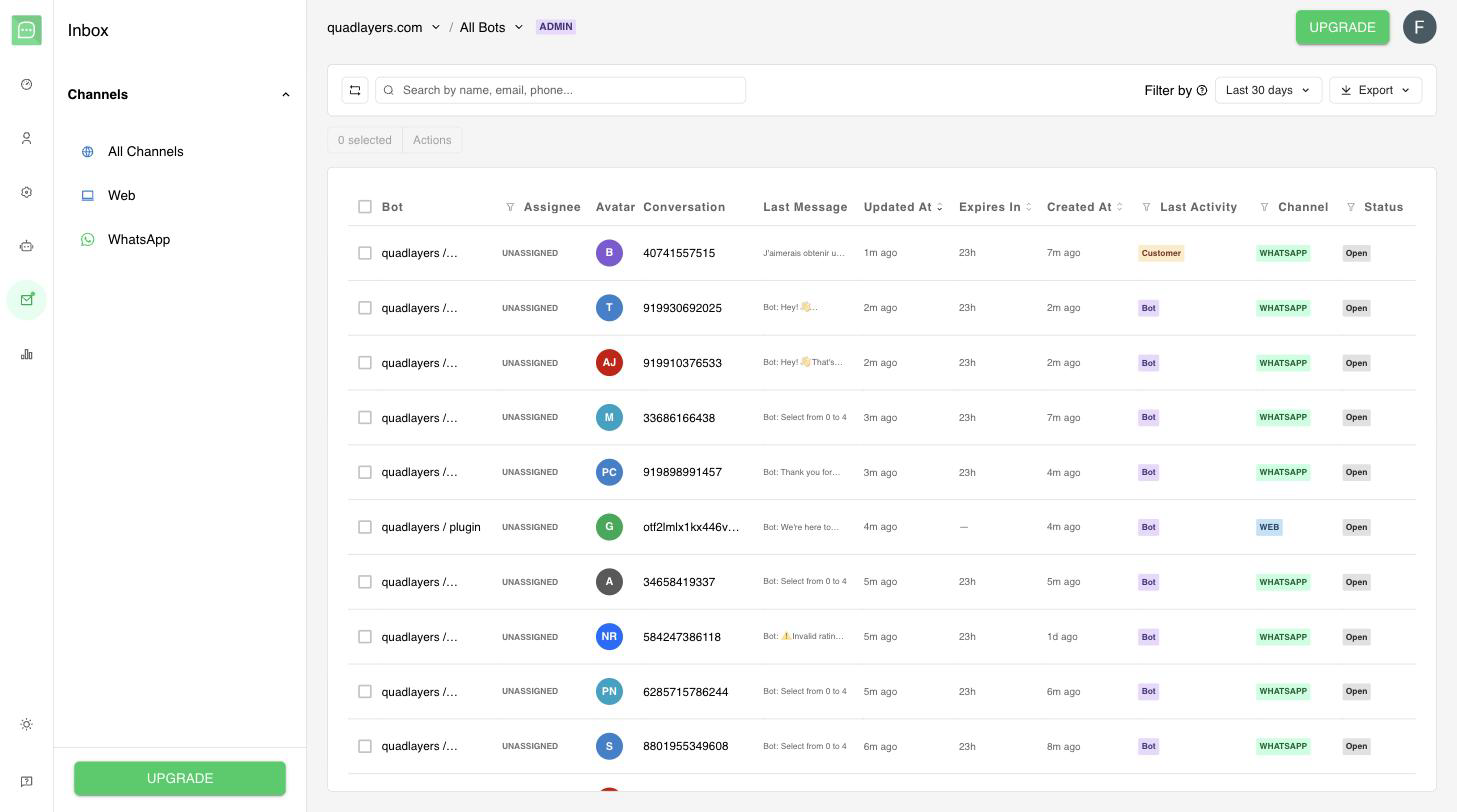
Quick.Bot’s shared inbox: assign live conversations to agents across WhatsApp and web from one place.

Figure: The end-to-end handoff lifecycle on WhatsApp.
What is chatbot-to-human handoff on WhatsApp?
Handoff is the transition of a live conversation from automation to a person. On WhatsApp it is more demanding than on web chat because the conversation lives on a phone number, not a browser session: the customer keeps the same thread forever, expects continuity, and will not tolerate repeating their order number to a “new” responder. A good handoff is invisible to the customer — the tone may change, but the context does not reset.
The channel raises the stakes. According to Meta’s developer documentation, “The WhatsApp Business Platform enables businesses to communicate with customers at scale,” and with more than 3 billion monthly users, every dropped or duplicated reply happens inside a personal thread the customer keeps forever.
The diagram below shows the full lifecycle a single conversation moves through, from the first bot turn to resolution and handback.
What is Quick.Bot?
Quick.Bot is a no-code, WhatsApp-first chatbot builder that turns WhatsApp into a sales and support channel and also expands to Web and Instagram. It has a visual drag-and-drop flow builder, a native shared team inbox where agents get conversation assignment and can reply directly, and automatic bot pausing when an agent takes over. Because the builder and the agent desk are the same product, handoff is native rather than glued together from separate tools.
When should a chatbot hand off to a human?
Hand off when automation stops adding value or when a human clearly adds it. The most reliable triggers are:
- Explicit request. The user types “agent”, “human”, “talk to someone”, or taps a “Talk to a person” button. This should always work.
- Repeated failure. The bot fails to understand the same input two or three times in a row. Looping is the fastest way to lose a customer.
- High-value intent. Pricing negotiation, a large order, a complaint, or a cancellation — moments where a person converts or retains far better than a script.
- Sensitive topics. Refunds, disputes, anything with a compliance or emotional weight.
- Business rules. VIP customers, specific product lines, or after a payment step where a person should confirm details.
The trigger should be explicit in your flow, not accidental. Define exactly which blocks or intents raise the “needs human” flag. For a deeper walk-through of trigger design, context passing, queues and SLAs, see chatbot-to-human handoff triggers and SLAs.
How do you transfer full context to the agent?
Transfer everything the agent needs to answer without asking the customer to repeat a word: the full message transcript, the variables the bot collected (name, email, order number, plan, cart), the reason for the handoff, and the customer’s channel identity. If any of this is missing, the customer feels handed to a stranger.
This is exactly where multi-tool stacks tend to leak. When the bot runs in one system and the inbox runs in another, the two share messages over an API or webhook, but structured variables, flow position, and “why this was escalated” often do not survive the trip cleanly. The agent sees the last message but not the journey.
In Quick.Bot the transcript and the collected variables are already attached to the conversation the agent opens, because the bot and the inbox are one product — there is no bridge for context to fall through.
Does the bot need to pause when a human joins?
Yes — and this is the single most common operational failure in DIY stacks. If the bot keeps evaluating the flow while an agent is typing, the customer receives two overlapping voices: the human answer and the bot’s next scripted step. It looks broken and it undermines the agent.
The fix is a pause state: when a conversation is assigned to a human (or an agent sends the first reply), the bot stops processing that conversation until it is explicitly resumed or closed. In hand-assembled setups this is a known headache — teams wire toggles, tags, or “chatbot enabled” flags between the builder and the inbox to switch the bot off and back on. We cover that exact problem, and how it is usually solved with Typebot plus Chatwoot, in how to pause the bot when a human agent joins.
Meta treats this control as a first-class concern too: its documentation describes a “Thread control” capability to “Manage handoffs between the AI agent and human agents.” In Quick.Bot the bot pauses on its own whenever a conversation moves to a human — whether the flow hands it off at any point, optionally to a specific member, or an agent takes it over from the inbox — with no toggle to build and no flag to keep in sync.
Can multiple agents work one WhatsApp number?
Not with the standard WhatsApp Business app — it is built for one device and one small team sharing a screen, so messages get claimed twice, missed, or answered in parallel. To put several agents on a single number safely you need a shared inbox on top of the official WhatsApp Cloud API, with routing so each incoming conversation lands with one owner.
A shared inbox gives you assignment (a conversation belongs to one agent), visibility (everyone sees status without stepping on each other), and routing (new chats go to the right person or queue). This is the difference between “a phone several people grab” and “a support desk.” The operational limits of doing this without an inbox are covered in WhatsApp with multiple agents on one number.
Quick.Bot provides that shared inbox with routing and assignment on one official number, so a team of agents can work the same WhatsApp line without losing or duplicating messages.
How do queues, SLAs and reassignment work?
Queues, SLAs and reassignment are the operational layer that keeps a busy line from dropping conversations. Once you have assignment, add:
- Queues. When all relevant agents are busy, conversations wait in an ordered queue rather than getting dropped. You can queue by product, language, or priority.
- SLAs. Set a target for time-to-first-response (for example, a human replies within two minutes of a handoff). Track it and you can see when you are missing it.
- Reassignment. If the assigned agent goes offline or does not pick up within the SLA window, the conversation should move to another available agent or back to the queue — not sit unanswered.
- Ownership handback. When the human resolves the issue, the conversation can be closed or handed back to automation for follow-up (satisfaction survey, receipt, next-step flow).
Why set the target so tight? Because response speed is the part of handoff that most directly moves money. In an audit of 2,241 U.S. firms, Harvard Business Review found:
Firms that tried to contact potential customers within an hour of receiving a query were nearly seven times as likely to qualify the lead (which we defined as having a meaningful conversation with a key decision maker) as those that tried to contact the customer even an hour later — and more than 60 times as likely as companies that waited 24 hours or longer.
That study measured hour-scale windows on email and phone leads; on WhatsApp, where customers expect near-instant replies, the curve compresses into minutes. The goal is that no conversation is ever “nobody’s job.”
Do you still need a separate inbox tool with your bot builder?
Often, no. The classic pattern is a bot builder for the flow and a separate shared-inbox product for the human layer, connected with middleware. That works, but you pay for it in three ways: two systems to run and update, context that can be lost at the boundary, and bot/agent state (pause/resume) that has to be kept in sync by hand.
For a full breakdown of that trade-off — the common Typebot + Chatwoot (and Evolution API) live-chat stack and when the glue stops being worth it — read do you still need Chatwoot with Typebot? And if you are weighing the two categories directly, Typebot vs Chatwoot: bot builder or agent desk? explains why they are different pieces of the puzzle rather than substitutes.
When a separate-tools stack is the better choice
A separate-tools stack is genuinely the right call in several cases. If you already run Chatwoot (or another mature help desk) and your agents live in it all day, bolting a bot onto that inbox keeps your team in familiar software. If you self-host for data-residency or cost reasons and have the engineering time to maintain it, open-source pieces give you full control. And if your bot and your support desk are owned by different teams with different roadmaps, keeping them decoupled can reduce coordination friction. A single-product approach wins on simplicity and context integrity; a best-of-breed stack wins on flexibility and reuse of tools you already operate.
Frequently asked questions
What is chatbot-to-human handoff on WhatsApp?
It is the transition of a live WhatsApp conversation from an automated bot to a human agent on the same number, carrying the full transcript and collected data so the customer does not have to repeat themselves. A complete handoff includes a trigger, context transfer, and automatic pausing of the bot while the agent is active.
How do I pause a bot when a human agent joins?
Move the conversation to a human so the bot enters a paused state and stops sending scripted messages until the conversation is resumed or closed. In hand-built stacks this is done with a toggle or flag between the builder and the inbox; in Quick.Bot the bot pauses on its own the moment the flow hands off or an agent takes the conversation over.
Can several agents use the same WhatsApp number?
Not reliably with the standard WhatsApp Business app, which is designed for one device and a small shared screen. Multiple agents need a shared inbox on the official WhatsApp Cloud API with routing and assignment so each conversation has a single owner.
What context should transfer to the agent during handoff?
The full message transcript, the variables the bot collected (such as name, email, order number, and plan), the reason for escalation, and the customer’s identity on the channel. Missing context is the most common reason customers feel handed to a stranger.
Do I need Chatwoot if I use Typebot?
Only if you want a separate shared-inbox and human-agent layer that Typebot itself does not provide. You can connect the two, or you can use a single product like Quick.Bot that includes the builder, the inbox, and native handoff together. See our Typebot and Chatwoot handoff guide for the trade-offs.
What SLA should I set for a WhatsApp handoff?
Aim for a human first response within one to two minutes of the handoff, with reassignment if the assigned agent does not pick up in that window. The exact number depends on your volume and staffing, but the direction is well established: Harvard Business Review found responding within an hour made firms nearly 7x more likely to qualify a lead, and on WhatsApp customer expectations compress that to minutes. Measure time-to-first-response and reassign stalled conversations.
Conclusion
A reliable WhatsApp handoff is not one feature — it is a trigger, a clean context transfer, a shared inbox with assignment, an automatic bot pause, and the SLA and reassignment rules that keep it predictable at volume. You can build this from separate tools, and for some teams that is right. But every seam between a builder and an inbox is a place where context, or the bot’s pause state, can go wrong.
Quick.Bot brings the bot builder, the shared team inbox, and automatic handoff together in one WhatsApp-first product, so the bot pauses on assignment and the agent opens every conversation with full context. Get the inbox, handoff and analytics in one platform — start free or book a demo →