By Francisco Mastromarino, Founder, Quick.bot · July 6, 2026
WhatsApp With Multiple Agents on One Number (Without Losing Messages)
Key takeaways
- To let multiple agents work one WhatsApp number without losing messages, you need a shared inbox with routing and assignment, not the standard WhatsApp Business app.
- The Business app only shares one undivided view across up to four linked companion devices, with no way to assign a conversation to a specific agent.
- A shared inbox built on the official WhatsApp Cloud API gives each conversation one owner, routes it to the right agent, and keeps a full history.
- Three things prevent lost messages: assignment (one owner per chat), routing (right agent), and status + history (nothing gets guessed at).
- Quick.Bot provides a native shared inbox with routing and assignment on a single number, connected through the official WhatsApp Cloud API.
The options for multiple agents on one number
Below: each option scored on the four things that decide whether messages get lost.
| Approach | Multiple agents | Assignment & ownership | Message loss risk | Scales |
|---|---|---|---|---|
| WhatsApp Business app | ⚠️ a few linked devices | ❌ | ⚠️ two agents can reply to one chat | ❌ |
| Everyone shares one login | ⚠️ | ❌ | ⚠️ high, no ownership | ❌ |
| Shared inbox on Cloud API | ✅ | ✅ | ✅ low, one owner per chat | ✅ |
| Quick.Bot native inbox | ✅ | ✅ assignment + ownership | ✅ low | ✅ |
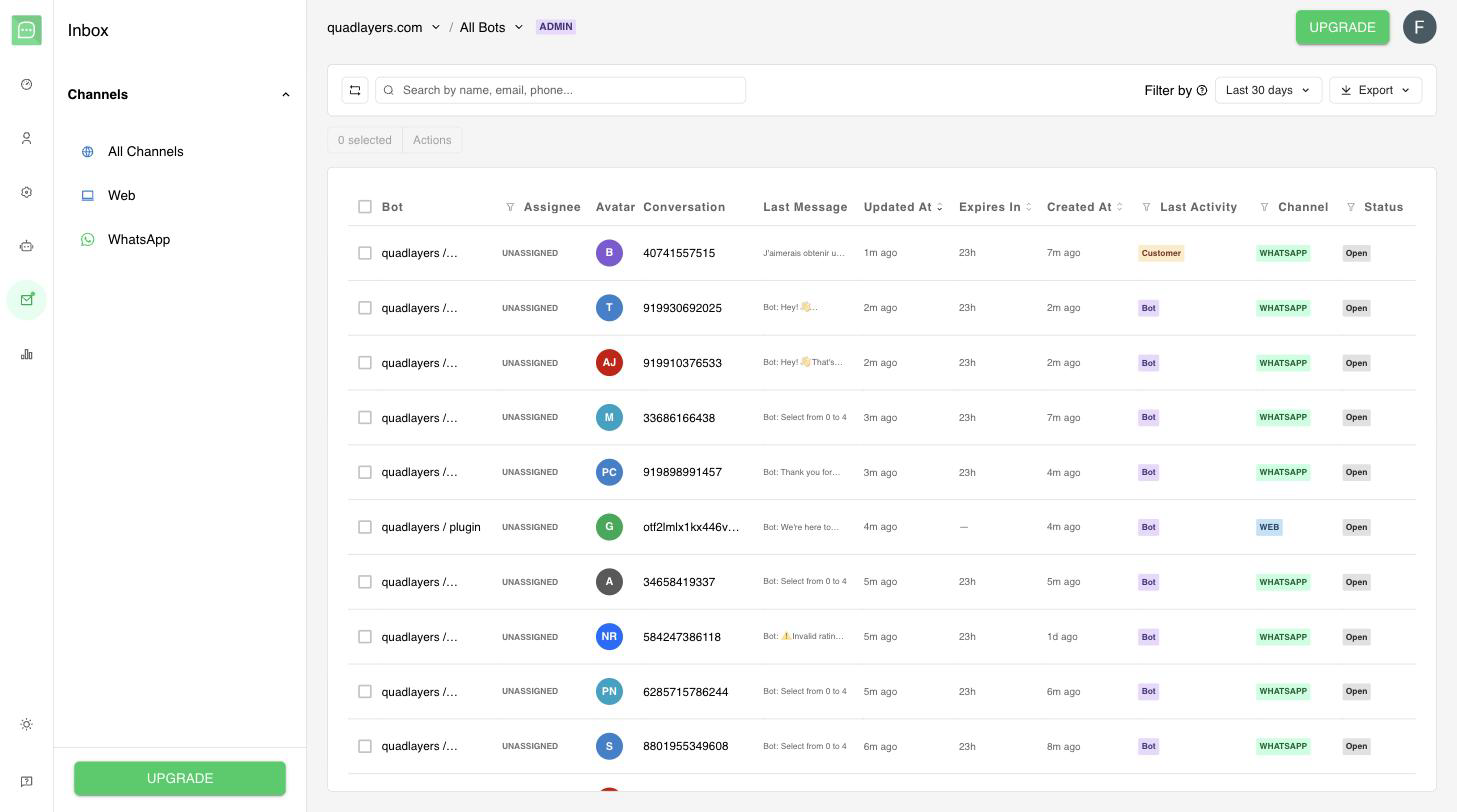
Quick.Bot’s shared inbox: assign live conversations to agents across WhatsApp and web from one place.
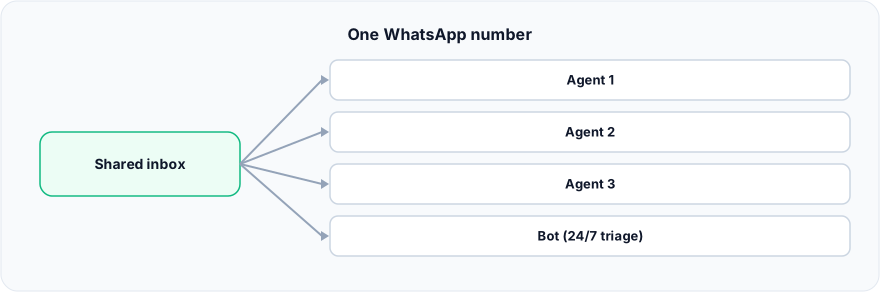
Figure: One WhatsApp number.
Why does the WhatsApp Business app break with a team?
The WhatsApp Business app breaks with a team because it is designed for a small business, not a support desk. It lets you link a limited set of companion devices to one account — up to four linked devices plus the primary phone — but everyone sees the same undivided inbox. There is no concept of assigning a conversation to a specific agent, no ownership, and no routing. In practice two agents can open the same chat and reply at once, a customer gets two different answers, and a conversation someone thought was handled is still waiting. As soon as more than one or two people share the number, messages start slipping through the cracks. In Quick.Bot each conversation has a single owner, so two agents never answer the same customer by accident.
What is a shared WhatsApp inbox?
A shared WhatsApp inbox is a single view of one WhatsApp number that multiple agents work together, with structure on top. Incoming conversations are routed to the right agent or team, each is assigned to one owner so responsibility is clear, and the full history stays attached to the conversation regardless of who handled it. The number stays the same for the customer; the difference is entirely on the team’s side. Shared inboxes for WhatsApp are built on the official WhatsApp Cloud API — which, in Meta’s words, “enables you to programmatically message and call on WhatsApp” — the sanctioned way to connect one number to a multi-agent tool.
How do you avoid losing messages with several agents?
You avoid losing messages with three things working together. First, assignment: every conversation has exactly one owner, so nothing sits in a pile that everyone assumes someone else is handling. Second, routing: conversations reach the agent or team best placed to answer, instead of landing in an undifferentiated inbox. Third, status and history: each conversation carries its state (open, pending, resolved) and full transcript, so an agent picking it up — or taking it over from a bot — sees everything. Without these, a shared login is just several people guessing which messages are already answered.
Do you need the WhatsApp Cloud API for this?
Yes, to do it properly you need the official WhatsApp Cloud API. Connecting one number to a multi-agent inbox requires it, typically through a provider that handles the setup. This is also what keeps you compliant and avoids the ban risk of unofficial gateways. With WhatsApp at 3 billion monthly active users (Meta, 2025), the official path is the one built to carry that volume. Quick.Bot connects through the official WhatsApp Cloud API via an embedded signup, so you get the shared inbox on your number without running your own gateway.
When is the WhatsApp Business app enough?
The WhatsApp Business app is enough when one or two people share a number and volume is low. A solo owner or a tiny team that coordinates informally can run on the app for a long time, and adding a shared-inbox platform would be more tooling than you need. The app stops being enough when you cannot tell who is answering what, when customers get duplicate replies, or when conversations are missed at busy times. That is the threshold where a shared inbox with assignment pays for itself.
Frequently asked questions
Can multiple agents use the same WhatsApp number?
Yes, but not well with the standard Business app, which only shares one undivided view across a few devices with no assignment. To have several agents work one number reliably, use a shared inbox built on the WhatsApp Cloud API, where each conversation has an owner.
How many devices can use one WhatsApp Business number?
The WhatsApp Business app supports a limited number of linked companion devices on one account up to four linked devices. That is enough for a very small team but offers no assignment or routing, so it does not scale to a real support team.
How do I stop two agents replying to the same customer?
Use a shared inbox that assigns each conversation to a single owner. With ownership, only the assigned agent handles a chat, so customers never get two conflicting replies.
Do I need the WhatsApp Cloud API for a shared inbox?
Yes. Connecting one number to a multi-agent inbox uses the official WhatsApp Cloud API, usually set up through a provider, which also keeps you compliant and avoids the ban risk of unofficial gateways.
Will customers see a different number with a shared inbox?
No. A shared inbox works on your existing WhatsApp number; the routing, assignment, and history all happen on the team’s side, invisible to the customer.
Conclusion
Multiple agents on one WhatsApp number works only when each conversation has an owner and a route. The Business app gives you a shared view but no ownership, so messages get missed and customers get duplicate answers as soon as a team shares it. A shared inbox on the official Cloud API fixes that with routing, assignment, and full history — which is exactly what Quick.Bot’s WhatsApp bot builder provides on one number. For how automation and human handoff fit on top of this, see our complete guide to chatbot-to-human handoff on WhatsApp.
Give your team a shared inbox with routing and assignment on one number. See the native inbox →