By Francisco Mastromarino, Founder, Quick.bot · July 24, 2026
WhatsApp Business With Multiple Users on One Number: The Real Limits
Key takeaways
- The WhatsApp Business app lets several people share one number, but everyone sees every chat — there is no way to assign a conversation to one person or record who replied.
- Meta’s own docs state a business can link up to 4 companion clients to a WhatsApp Business app account, so roughly 5 devices total run one number (Meta Verified is widely reported to raise this, though Meta does not publish a figure).
- The app has no assignment, no per-agent history, no routing, and no internal notes — the four features a support or sales team actually needs.
- For a real team you move to a shared inbox or the WhatsApp Business API; Quick.Bot puts a routed, multi-agent shared inbox on top of one official number.
- WhatsApp reaches over two billion users, which is why running a team on one number correctly matters more on this channel than any other.
Comparison at a glance
| Capability | WhatsApp Business app (linked devices) | Shared inbox / WhatsApp API |
|---|---|---|
| Multiple people on one number | ✅ Up to ~5 devices (more with Meta Verified) | ✅ Seats set by your plan, not by a device limit |
| Assign a chat to one agent | ❌ Everyone sees everything | ✅ Assignment + ownership |
| See who replied to whom | ❌ No audit trail | ✅ Per-agent history |
| Routing rules / queues | ❌ None | ✅ Rules, queues, handoff |
| Internal notes on a conversation | ❌ Not supported | ✅ Private notes |
| Works if the main phone is offline | ⚠️ Linked devices stop working if the primary phone is offline ~14 days | ✅ Cloud-hosted, always on |
| Automation / chatbot | ⚠️ Basic greeting/away messages | ✅ Full flow automation |
| Cost | ✅ Free app | ⚠️ API messaging fees + platform |
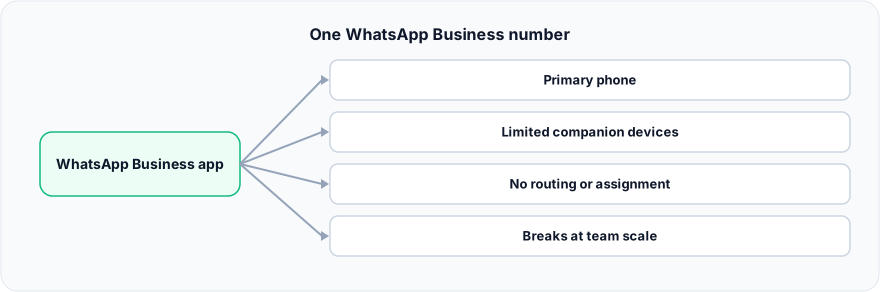
Figure: One WhatsApp Business number.
What does “multiple users on one number” actually mean?
It means two very different things, and confusing them is where teams get stuck. The first is multiple devices, one identity: the WhatsApp Business app supports linked (companion) devices that all mirror the same account, so several phones or desktops show the same conversation list. The second is multiple agents, separate work: each person owns their own conversations, hands off to a colleague, and leaves a trail of who did what. The app solves the first and creates a false sense that it solves the second.
How many devices can share one WhatsApp Business number?
A business can link up to four extra devices to one number, so around five devices total share the account. According to Meta’s WhatsApp Business Platform documentation:
“Businesses can link up to four WhatsApp ‘companion’ clients to their WhatsApp Business app account on other devices.”
A Meta Verified subscription is commonly cited as raising this ceiling, though Meta does not publish a specific figure — confirm it against your own account before planning around it. All linked devices share one inbox, so any device can read and reply to any chat.
Two constraints matter here. Everyone sees everything — there is no per-person view, so if five people are linked, all five see the full conversation list. And the primary phone is a dependency: if the main phone stays offline for roughly 14 days, the linked devices stop working. Your “team access” is tied to one physical handset staying online.
Why does the WhatsApp Business app break at scale?
It breaks the moment conversations need to be owned, because the app was built for a single person, not a team. The specific failure points:
- No assignment. You cannot route a chat to one agent and take it off everyone else’s plate, so two agents reply to the same customer or both assume the other has it.
- No accountability. There is no record of who answered a given customer, so you cannot measure per-agent response times or resolve disputes about what was said.
- No routing or queues. Every new message lands in one shared pile; nothing sends billing to one person and sales to another automatically.
- No internal notes. Agents cannot leave a private note (“customer waiting on a refund”), so context lives in people’s heads.
- Reply collisions. Because all devices are equal, a customer can get two different answers from two agents who did not know the other was typing.
None of these are bugs — a personal-scale tool is being asked to do team-scale work.
This is exactly where teams move from the app to a shared inbox: in Quick.Bot, one official number feeds a real-time inbox where each conversation is assigned and owned by a single agent, so two people never talk over each other.
When do you actually need a shared inbox or the API?
Move off the plain app when any one of these is true: more than 2–3 people answer the same number; you need to know who replied and how fast; you want to route by topic, language, or team; you need a bot to handle first contact and hand off with full context; or you send broadcasts at volume and need the official WhatsApp Cloud API instead of a phone app. If you have two people and low volume, the free app is genuinely fine — do not over-build.
When the WhatsApp Business app is the better choice
The free app is the right call for a solo operator or a two-person business with modest volume. It costs nothing, sets up in minutes on a normal phone, and needs no API approval, no template review, and no per-message fees. If you rarely have two people replying at once and you do not need to measure response times or route conversations, adding a platform on top is just overhead. Start with the app; graduate to a shared inbox when the lack of ownership starts costing you customers.
Frequently asked questions
Can multiple users use the same WhatsApp Business number at once?
Yes. The WhatsApp Business app supports linked devices, so one primary phone plus up to 4 companion devices (around 5 total) can use the same number, reportedly extendable with Meta Verified. However, all devices share one inbox with no assignment or per-agent tracking.
How many devices can be linked to one WhatsApp Business account?
Meta’s docs state a business can link up to four companion clients, so roughly 5 devices total run one number. A Meta Verified subscription is often cited as raising that ceiling, but Meta does not publish the number. Every linked device sees the same conversations.
Can two agents be assigned different WhatsApp chats on one number?
Not in the free WhatsApp Business app — there is no assignment or ownership, so every linked device sees every chat. To assign conversations to individual agents you need a shared inbox built on the WhatsApp Business API, such as Quick.Bot.
What happens if the primary phone goes offline?
Linked (companion) devices keep working for a limited period, but if the primary phone stays offline for about 14 days the linked devices stop working. A cloud-based shared inbox on the API does not depend on any single phone staying online.
Do I need the WhatsApp Business API for a team?
You need it once you require assignment, routing, per-agent reporting, or automation with human handoff. The plain app has no way to give each conversation an owner, which is the core requirement for a support or sales team.
Is using multiple agents on one number against WhatsApp’s rules?
No. Linked devices are an official feature, and building a shared inbox on the official WhatsApp Business API is fully supported. The risk comes from unofficial QR-based tools, not from multi-agent access done through official channels.
Conclusion
Multiple people can share one WhatsApp Business number — but “sharing a device list” is not the same as “running a team.” The app gives you shared access with no ownership, no routing, and no accountability, and that gap starts costing you the moment conversations become work. If you have outgrown the app, Quick.Bot puts a native shared inbox with assignment, ownership, and human handoff on top of a single official WhatsApp number — no lost messages, no talking over each other.
See how multi-agent works on one number → Quick.Bot WhatsApp bot builder