By Francisco Mastromarino, Founder, Quick.bot · August 4, 2026
Why WhatsApp Blocked My Number — and How to Get It Back
Key takeaways
- First, work out which “block” you are facing: a single user blocking you does nothing to your account, while a WhatsApp ban locks the number out of the app entirely.
- If the number is banned, request a review from inside the app — that appeal is the only route that can restore it. No third-party “unban” service can.
- For business numbers the trigger is usually not the wording of the messages but how the number is connected. Unofficial QR tools mirror WhatsApp Web and are detected as automation.
- “QR” names two opposite things. Unofficial QR (Baileys, WAHA, Evolution API) is a ban risk; official QR onboarding registers a real WhatsApp Business account with Meta and is sanctioned.
- On the official platform, failure is graded and visible — quality rating drops, messaging limits shrink, the number gets flagged or restricted — instead of a number vanishing overnight with every conversation on it.
- Broadcast lists cap at 256 recipients and only deliver to people who have your number saved. Working around that with a bulk sender is the most common route to a banned business number.
- Prevention is structural: get consent before the first message, keep the block and report rate low, warm up volume gradually, and move anything revenue-bearing onto an official connection.
Blocked by a user, or banned by WhatsApp?
These get confused constantly, and the fix is completely different. If one person blocked you, your account is fine: your messages to that contact stay on a single check mark forever, their profile photo and last-seen disappear, and calls never connect — but everything else in WhatsApp works normally. There is nothing to appeal, and nothing to fix on your side.
A ban is different. You open the app and it refuses to let you in, showing something close to “This account is not allowed to use WhatsApp” — older builds worded it as “Your phone number is banned from using WhatsApp”. That is WhatsApp acting on the account, not a contact acting on you, and it comes in two flavours: a temporary ban that lifts on its own after a countdown, typically a few hours up to around 24, and a permanent ban that only an appeal can undo.
Everything below is about the second case — and, for businesses, about why it keeps happening to the same numbers.
How to get a banned WhatsApp number back
Work through this in order. It is short, and there are no shortcuts in it.
- Request a review inside the app. The ban screen carries a “Request a review” button. Tapping it sends a 6-digit code by SMS to confirm you control the number, and then gives you a short text box to explain yourself. Use it before anything else — it is the only channel that reaches the team who can reverse a ban.
- Say what changed, not just that it is unfair. If you were on a modified client, or running automation, state that you have removed it. An appeal that explains the cause and the remedy is answerable; “I did nothing wrong” is not.
- If you were on a modified app, uninstall it first. GB WhatsApp, WhatsApp Plus and similar clones are an automatic violation. Export your chat history from the clone while you still can, then install the official app from the official store.
- Wait out a temporary ban. If the screen shows a countdown, it will clear on its own. Reinstalling, changing device or reactivating through another route does not shorten it and can escalate the case.
- Ignore paid “unban” services. They cannot reach any internal system, they routinely ship malware, and handing them your number and verification code is how a recoverable ban turns into a stolen account. Only WhatsApp can lift a WhatsApp ban.
Meanwhile, plan for the appeal failing. If the number carries your customer conversations, the recovery plan and the prevention plan are the same thing — and that is the rest of this article.
Why WhatsApp blocks numbers
The public policy reasons split cleanly into two groups, and mixing them up is why so much advice on this topic misses for businesses.
| Trigger | Who it usually hits | What is actually detected |
|---|---|---|
| Modified clients (GB WhatsApp, WhatsApp Plus) | Personal users | Unofficial client signature — an automatic violation |
| Being blocked or reported by many recipients | Both | Block and report rate relative to messages sent |
| Messaging people who never gave you their number | Businesses | High volume of first contacts to non-contacts |
| Identical bulk messages to large lists | Businesses | Repetition plus burst rate — a classic spam fingerprint |
| Unofficial automation on the number | Businesses | Non-official connection behaving like a bot |
| Adding strangers to groups, rapid group joins | Personal users | Behavioural pattern typical of spam rings |
| Impersonation, harassment, malware | Both | Reports plus content review |
If you are a person whose number got banned, your cause is almost certainly in the “personal users” rows, and the appeal above is the whole answer. If you are a business, keep reading: the row that matters most is the one about how the number is connected, because it is the only one that is invisible to you until it fires.
Personal, Business app, Cloud API: which WhatsApp are you actually on?
“WhatsApp” is three different products with three different rulebooks, and most bans happen because a business is using one of them to do a job that belongs to another. Before changing anything, work out which one you are on.
| WhatsApp (personal) | WhatsApp Business app | WhatsApp Cloud API | |
|---|---|---|---|
| Intended for | Personal conversations | Small businesses answering by hand | Businesses with volume, automation or a team |
| Business profile, catalog, labels | ❌ | ✅ | ✅ Profile via the platform |
| Devices on one number | Phone + up to 4 linked devices | Phone + up to 4 linked devices | ✅ No device ceiling — it is an API |
| Official automation | ❌ None | ❌ Only canned replies and away messages | ✅ Full programmatic messaging |
| Broadcast reach | ⚠️ 256 per list, contacts only | ⚠️ 256 per list, contacts only | ✅ Templates to opted-in users, capped by your tier |
| Message limits | Informal, anti-spam only | Informal, anti-spam only | ✅ Published tiers, visible in the Manager |
| Cost | Free | Free | ⚠️ Billed per message by template category |
| What failure looks like | ❌ Number banned, no warning | ❌ Number banned, no warning | ✅ Quality drops → limits lowered → restricted |
WhatsApp personal
The consumer app. No business profile, no catalog, no automation, and its terms are written for personal use — running a company from it gives you none of the business tooling and all of the ban exposure. One phone plus up to four linked devices share the account, and every commercial thing you might want to do has to be done by hand.
Recommendation: if you are taking customer messages on a personal number, move to the Business app. It is free and takes minutes.
WhatsApp Business app
The free app for small businesses: business profile, catalog, labels, quick replies, greeting and away messages. What it does not have is an API, so any real automation on it comes from unofficial tools — which is precisely the connection that gets numbers banned. Its device ceiling is the same one phone plus four linked devices, which is also where teams hit the wall: everyone sees every chat, and nobody can be assigned anything.
Recommendation: excellent up to a few people answering manually. The moment you want automation, assignment, or outbound at volume, connect it officially — coexistence lets you link the same number to the platform without losing the app.
WhatsApp Cloud API
Meta’s official programmatic channel. There is no app to open: you reply free-form inside the 24-hour customer service window opened by a customer message, and outside it you send pre-approved templates, billed per message by category. In exchange you get published messaging tiers, a quality rating you can watch, and a real account relationship — the difference between being warned and being deleted.
Recommendation: the right home for anything with a team, a bot, or outbound campaigns. See QR vs Cloud API for how the limits scale.
Broadcast lists: the feature that gets business numbers banned
Broadcast lists are where most well-intentioned businesses walk into a ban, because the feature looks like bulk messaging and is not. A broadcast list sends your message to each recipient as an individual, private chat — they do not see each other and replies come back one to one, which is what makes it different from a group.
Two hard constraints define what it can actually do:
- 256 recipients per list. That is the cap on both the personal and Business apps. Splitting one campaign across ten lists to get around it is exactly the burst pattern anti-spam looks for.
- The recipient must have your number saved in their contacts. This is the rule almost everyone misses. If they have not saved you, the broadcast is simply not delivered to them — so blasting a bought or scraped list reaches close to nobody while still looking, from the outside, like an attempt at mass unsolicited messaging.
That combination is what drives teams to unofficial bulk senders: the official feature “doesn’t work”, so they reach for a tool that ignores the rules — and the ban follows from the tool, not from the list. Even when a broadcast does deliver, sending byte-identical text to hundreds of people concentrates blocks and reports into a few minutes, which is the strongest negative signal your number can generate.
Do not confuse broadcast lists with Channels, either. Channels are a public, follow-based, one-way feed — useful for announcements to an audience that opted in, but not a customer messaging tool, and not a substitute for reaching your actual customers.
What to do instead
- Under 256 people who all have you saved? A broadcast list is genuinely fine. Personalise the text, and do not run the same blast weekly.
- Anything larger, or anyone who has not saved you? That is the Cloud API with approved templates and recorded opt-in. No 256 cap, no contacts requirement, and delivery bounded by your messaging tier instead of by luck.
- Never buy or scrape a list. It is the fastest route to a block rate that takes the number down, on any connection method.
- Keep marketing separate from service. Marketing templates are rate-limited in ways service messages are not. Meta paces a new marketing template by delivering it to a sample of your audience first and reading the feedback before releasing the rest, and it caps how many marketing messages one person receives in a period. Neither threshold is published, so treat two to four marketing templates per contact per month as a working ceiling and keep promotions off the number your support line runs on.
The root cause most businesses miss: how the number is connected
A number automated through an unofficial tool is not judged only on what it sends. The connection itself is the violation. Tools like Baileys, and the platforms built on it such as WAHA and Evolution API, work by reverse-engineering WhatsApp Web: you scan a QR code and the server then pretends to be a linked browser session. WhatsApp’s anti-abuse systems look for exactly that shape — a client that is not an official client, behaving with machine-like timing and volume.
That is why the bans feel arbitrary. Teams tighten their copy, slow down their sending, clean their lists, and get banned anyway, because the thing being detected was never the copy. And because there is no account relationship behind an unofficial connection, there is no warning and no appeal path worth much: the number simply stops working.
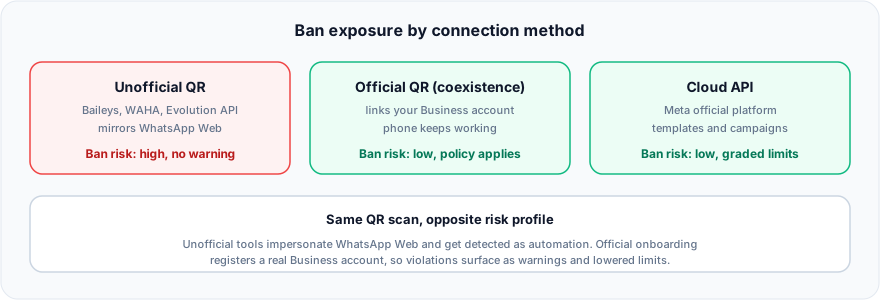
Figure: ban exposure by connection method.
Unofficial QR vs official QR: the same scan, opposite risk
This is the distinction that decides whether the ban happens again, and it is buried under a single overloaded word. Both routes start with you pointing your phone at a QR code. What happens next is not remotely the same.
Unofficial QR — impersonating WhatsApp Web
The tool registers itself as a linked device using a re-implementation of WhatsApp’s protocol. Nothing about it is sanctioned, there is no business account, no policy agreement, and no support channel. It is free and it runs this afternoon, which is the entire appeal. The cost is that your number is one detection sweep away from disappearing, and it breaks on its own whenever WhatsApp changes the web protocol.
Official QR onboarding — coexistence
The same gesture, through Meta’s own onboarding: you scan a code to link an existing WhatsApp Business account to the official platform, and the handset keeps working. Your team answers from a shared inbox while someone can still reply from the phone. Nothing is being impersonated — Meta issued the connection, so the account is subject to policy, but it is not inherently violating it.
Cloud API — the number lives in the platform
Registering the number on the Cloud API takes it out of the WhatsApp app: from then on it lives in the platform rather than on a phone. In exchange you get pre-approved template campaigns and bulk outbound, which coexistence does not offer. It is the right route when outbound volume matters more than keeping the handset.
So the honest framing is not “QR is dangerous, API is safe”. It is: unofficial QR is dangerous, and both official routes are safe — pick between them on whether your team still needs the phone in their hands. We break the trade-off down further in QR vs Cloud API for WhatsApp automation.
What a “ban” looks like on the official platform
Official numbers are not immune to policy — but the failure mode is graded and visible, which is the real difference for a business. Instead of a number silently going dark, you get a sequence of signals in the Business Manager before anything terminal happens:
- Quality rating: High, Medium or Low. Shown as green, yellow and red, and derived from recent user feedback — blocks and reports over roughly the last 24 hours of messages. It drops before your limits do, so it is the early warning you actually get.
- Flagged status. When quality hits Low the number is flagged and you have about 7 days to recover. Improve, and it returns to Connected with your limit intact. Stay Low, and the messaging limit drops one tier — a number cleared for 100,000 new customers per 24 hours falls to 10,000.
- Restricted status. The number has hit its messaging limit and cannot start new conversations until the window resets, while replies inside open customer service windows continue.
- Account-level warnings. Serious or repeated policy violations act on the business account, with notice, rather than deleting a phone number without explanation.
None of that is a promise you cannot be shut down. It is the difference between a system that tells you when you are drifting and one that only tells you when it is over.
How to stop it happening again
- Move anything revenue-bearing to an official connection. Prototypes and throwaway numbers can stay on unofficial QR. Your main business number should not be one detection sweep from vanishing.
- Never open a conversation with someone who did not opt in. First contact with strangers is the single strongest spam signal, on any connection method.
- Watch the block rate, not the send rate. Recipients blocking or reporting you is what the rating is built on. If a campaign spikes blocks, stop it — do not simply slow it down.
- Warm up gradually. A brand-new number going straight to thousands of first contacts reads as spam regardless of intent. Volume grows into higher limits over time.
- Vary and personalise outbound. Byte-identical broadcasts to a large list are trivially detectable and are what most recipients report.
- Make it easy to leave. A working opt-out converts a would-be report into a quiet unsubscribe, which costs you nothing.
- Keep a human on the other end. Conversations that reach a real agent get reported far less than ones that dead-end in a bot loop — one reason a clean handoff to a human is a deliverability feature, not just a support one.
Frequently asked questions
How do I know if someone blocked me or WhatsApp banned my number?
If one contact blocked you, the app still works everywhere else — you just see a single check mark on messages to them, no profile photo, and failed calls. If WhatsApp banned the number, you cannot use the app at all and see a message saying the number is not allowed to use WhatsApp. Only the second case can be appealed.
Can I get an unbanned WhatsApp number back?
Sometimes. Request a review from the ban screen in the app and explain what caused it and what you have changed. Temporary bans clear on their own. No third party can reverse a ban, and services claiming otherwise are a security risk rather than a route back.
What is the difference between WhatsApp Business and the WhatsApp API?
The Business app is a free phone app for small businesses — profile, catalog, labels, canned replies — with no API and a ceiling of one phone plus four linked devices. The Cloud API is Meta’s programmatic channel: no app, full automation, published messaging tiers, and per-message billing on templates. The app suits a couple of people answering by hand; the API suits a team, a bot, or outbound campaigns.
How many people can I send a WhatsApp broadcast to?
A broadcast list holds up to 256 recipients on both the personal and Business apps, and the message only reaches those who have your number saved in their contacts. On the Cloud API there is no 256 cap — you send approved templates to opted-in users, bounded by your messaging tier instead.
Why is my WhatsApp broadcast not delivering?
Almost always because the recipients have not saved your number. Broadcast lists deliver only to contacts who have you saved, so a bought or scraped list reaches close to nobody. Working around that with an unofficial bulk sender is the single most common way business numbers get banned.
Why does WhatsApp keep banning my business number?
Usually because of the connection, not the content. Unofficial QR tools such as Baileys, WAHA and Evolution API impersonate WhatsApp Web, and that pattern is what anti-abuse systems look for. Cleaning up your copy will not help if the connection itself is the violation.
Will using the WhatsApp Cloud API stop my number being banned?
It removes the policy-ban risk that comes from an unofficial connection, but it does not licence spam. Official numbers still carry a quality rating and can be flagged or restricted for high block and report rates — the difference is you get warned first and can correct course.
Is scanning a QR code to connect WhatsApp always risky?
No — it depends entirely on what is on the other side of the scan. Official QR onboarding links your real WhatsApp Business account to Meta’s platform and keeps the phone working. Unofficial tools use the same gesture to register a fake linked device. Same scan, opposite risk.
How long does a WhatsApp ban last?
Temporary bans display a countdown and lift by themselves, usually within a few hours and rarely more than 24. Permanent bans do not expire — the only route is the in-app review request. Meta does not publish a response time; in practice most people report an answer within 24 to 72 hours, with some cases running a week or longer, and plenty of appeals coming back denied.
Can I move my existing WhatsApp Business number to an official connection?
Yes. Official QR onboarding links the number you already use while leaving the app on the phone intact; registering it on the Cloud API moves it into the platform instead. Either way you keep the number and the history your customers know.
Conclusion
If your number is blocked right now, the order is: identify whether it is a user block or a ban, appeal from inside the app, and remove whatever caused it. If it is a business number, treat the ban as information rather than bad luck — it is usually telling you that the number was connected through a tool WhatsApp never sanctioned, and that will keep being true after the appeal. The route out is an official connection, chosen on whether your team still needs the handset. If you also run a team on that number, the same official connection supports a shared inbox with multiple agents.
Quick.Bot connects through official routes — QR onboarding with coexistence, or the Cloud API through a BSP partner with embedded signup — so the number your business runs on is not one anti-spam sweep from disappearing.
Build on the official WhatsApp path → Quick.Bot WhatsApp bot builder