By Francisco Mastromarino, Founder, Quick.bot · June 30, 2026
How to Pause a Typebot Bot When a Human Agent Joins

Key takeaways
- To pause a Typebot bot when a human agent joins, you change the conversation’s status so the bot stops responding to it.
- In the Typebot + Chatwoot stack, this runs through Chatwoot’s agent-bot handoff: the conversation moves from
pendingtoopenand the bot stops replying. - It works, but you have to wire and test the status signal in both directions — pausing on join and resuming after — across just 2 conversation states.
- The most common Typebot + Chatwoot complaint, a bot talking over the agent, is almost always a status-sync gap, not a bug in either tool.
- Quick.Bot is an alternative with two native paths: the flow can hand off at any point — optionally to a specific member — or an agent can take a conversation over from the inbox at any moment. Either way the bot pauses on its own, with no status flag to keep in sync.
Ways to pause the bot when an agent joins
Below: each approach, how the bot actually pauses, and the effort it takes.
| Approach | How the bot pauses | Config effort |
|---|---|---|
| Chatwoot agent-bot handoff | Status changes pending → open, bot stops responding | You wire and test the handoff |
| Manual status toggle in the inbox | Agent flips the conversation to open | Manual, per conversation |
| Custom flag / variable in the flow | Flow checks a “human active” variable before replying | You build and maintain it |
| Quick.Bot native | Bot pauses when the flow hands off or an agent takes over | None |
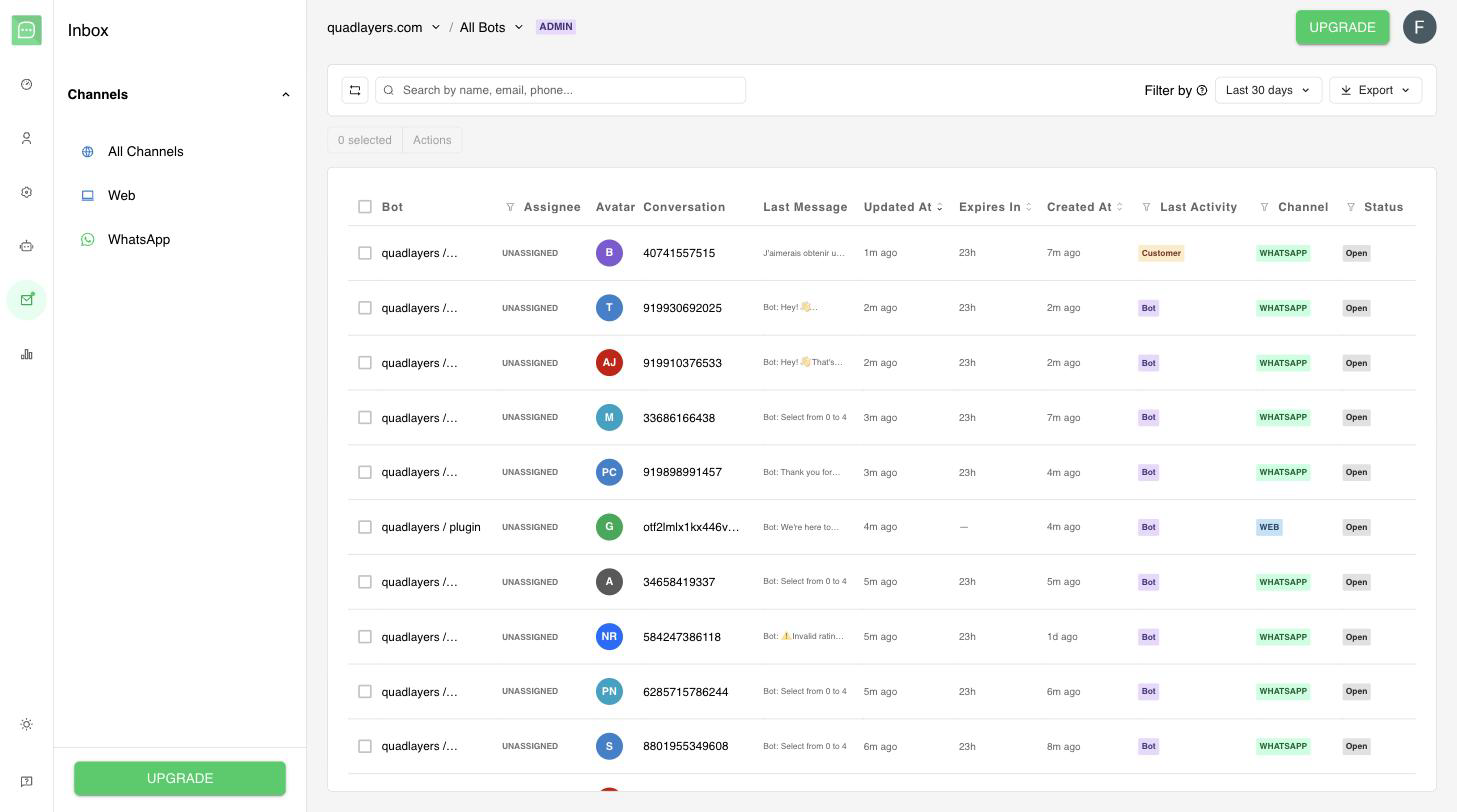
Quick.Bot’s shared inbox: assign live conversations to agents across WhatsApp and web from one place.

Figure: The bot pauses the moment an agent joins, then resumes.
Why does the bot need to pause at all?
The bot needs to pause so it does not reply into the same thread at the same time as the human. If it does not, the customer sees an automated message land right after, or on top of, the agent’s answer, which reads as broken and undoes the trust a human was brought in to build. The whole point of handoff is that a person takes over cleanly; a bot that keeps talking defeats it. This is one of the most common complaints in Typebot + Chatwoot setups, and it is almost always a status-sync problem, not a bug in either tool.
How to pause a Typebot bot in Chatwoot
You pause a Typebot bot in Chatwoot by moving the conversation out of the bot-handled state. As Chatwoot’s documentation explains:
“When an agent bot is connected to an inbox, conversations are created with a ‘pending’ status, allowing it to triage the conversation before passing it on to a human agent.”
When a human should take over, the handoff sets the status to open and the bot stops responding to open conversations. So “pausing the bot” is really “moving the conversation out of the bot-handled state.”
To make this reliable you need three things: trigger the handoff at the right point in the flow (an explicit request, a low-confidence branch, or an agent manually opening the conversation); ensure the status actually changes when an agent joins, not only when the bot decides to escalate; and confirm the bot re-enables correctly if the conversation is handed back. The gap most teams hit is the middle one: an agent jumps into a still-bot-handled conversation, the status never flips, and the bot keeps replying over them.
If you find yourself testing status transitions and writing custom variables just to stop a bot from interrupting your agents, that is the maintenance tax of gluing two systems together. In Quick.Bot the bot builder and the inbox are the same product, so assignment and bot state are never out of sync.
How to re-enable the bot after the agent is done
You re-enable the bot by returning the conversation to a bot-handled state — in Chatwoot, moving it back to pending. The reverse case matters too: when the human finishes, you often want the bot to resume, for example to send a closing survey or handle the next message automatically. Decide this deliberately: sometimes you want the bot back on, sometimes you want the conversation to stay human until it is resolved. Whichever you choose, test both directions, because a bot that resumes at the wrong moment is as jarring as one that never paused.
When the Typebot + Chatwoot approach is fine
The Typebot + Chatwoot approach is fine when you are already committed to the open-source stack and have set up the agent-bot handoff carefully. It works well and gives you full control over exactly when the bot pauses and resumes. Teams that want to self-host and customize the escalation logic will find Chatwoot’s status-based model flexible. The approach is a fair choice when you have the engineering time to wire and test it; the downside is simply that the pausing behavior is yours to build and keep working across upgrades.
Frequently asked questions
How do I stop a Typebot bot from replying when an agent takes over?
Move the conversation out of the bot-handled state so the bot no longer responds. In Typebot + Chatwoot this is done via the agent-bot handoff, which changes the conversation status to open and stops the bot from replying.
Why does my Typebot bot keep talking over my agents?
Almost always because the conversation status did not change when the agent joined, so the bot still treats it as bot-handled. Make sure the handoff or a manual status toggle fires whenever a human enters the thread.
Can the bot resume after the agent finishes?
Yes. Returning the conversation to a bot-handled (pending) state lets the bot respond again, for example to send a survey or handle the next inquiry. Test this path, since a bot that resumes at the wrong time is disruptive.
Is there a way to pause the bot without any configuration?
Yes. In Quick.Bot an agent can take a conversation over from the inbox at any moment and the bot pauses on its own. You can also hand off from any point in the flow and route it to a specific member. Neither path needs status wiring between two systems.
Does pausing the bot lose the conversation context?
It should not. Pausing only stops the bot from replying; the history stays with the conversation. In a native inbox the agent keeps full context when the bot pauses.
Conclusion
Pausing a Typebot bot when a human joins comes down to conversation state: take the conversation out of the bot-handled state and the bot goes quiet. In the Typebot + Chatwoot stack that is a handoff you configure and test in both directions; done right, it is reliable. If you would rather not maintain the status wiring at all, Quick.Bot’s WhatsApp bot builder pauses the bot on assignment automatically. For the wider picture, see the native handoff explained and our complete guide to chatbot-to-human handoff on WhatsApp.
Let the bot pause itself the moment an agent joins. See the native inbox →