By Francisco Mastromarino, Founder, Quick.bot · July 14, 2026
Typebot Analytics: What’s Missing, and How Do You Get Real Funnel Data?
Key takeaways
- Typebot analytics tracks three core metrics — Views, Starts and Completions — plus a per-input drop-off rate that is only revealed on the Pro plan, and it exports results to CSV.
- What is missing for teams wanting real funnel data is analytics past the bot into the human handoff: agent resolution rate, time-to-first-response after escalation, and full bot-plus-agent transcripts.
- Typebot is an open-source conversational form and chatbot builder; Quick.Bot is a WhatsApp-first builder with a native shared inbox, so the bot conversation and the agent conversation live in one record instead of two disconnected tools.
- The gaps are scope gaps, not bugs — a builder measures the bot, and WhatsApp revenue is usually closed by an agent after the bot qualifies the lead.
Typebot analytics covers the essentials for a bot builder — Views, Starts, Completions and a per-input drop-off rate, with CSV export — but it is built to measure the automated flow, not the full customer journey. Below is a fair look at what is missing and three practical ways to get real funnel data.
Typebot analytics vs a builder-plus-inbox platform
Where Typebot’s builder analytics stop and where a native-inbox platform continues.
| Analytics need | Typebot | Quick.Bot |
|---|---|---|
| Views / Starts / Completions | ✅ Built in | ✅ Built in |
| Per-input drop-off rate | ✅ Revealed on Pro plan | ✅ Marked on the flow graph |
| CSV export of results | ✅ Yes | ✅ Yes |
| Post-handoff agent metrics | ❌ Outside a builder’s scope | ✅ Native inbox analytics |
| Resolution rate (bot + human) | ❌ Not measured | ✅ Measured across both |
| Full bot + agent transcript | ⚠️ Bot transcript focus | ✅ One combined thread |
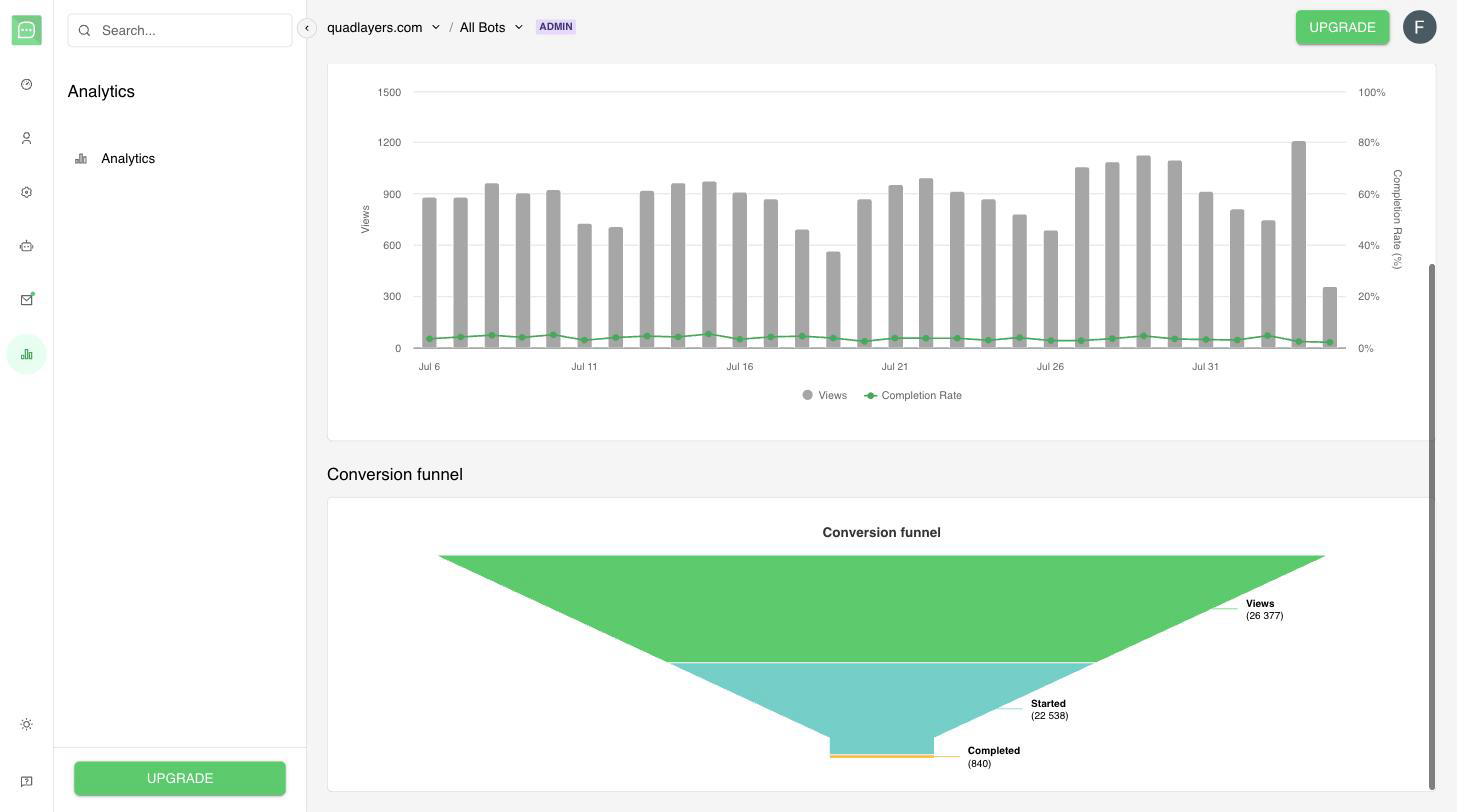
Quick.Bot’s conversion funnel shows where users drop off, from views to completion.
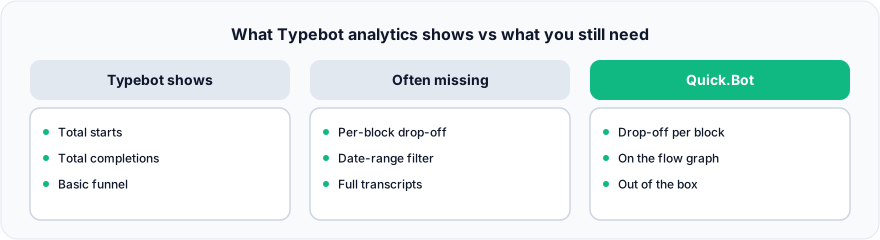
Figure: What Typebot analytics shows vs what you still need.
What is Typebot analytics?
Typebot analytics is the results and insights layer of Typebot, an open-source conversational form and chatbot builder. It tracks Views (each time a typebot loads), Starts (when a visitor submits a first answer) and Completions (when the flow reaches an end with at least one submitted answer), and it lets you export results to CSV. Typebot’s documentation describes the feature plainly: “The in-depth analytics help you identify user drop-off points and gain insights into user behavior so that you can incrementally improve your chat conversion rate.” For a self-contained bot — a quiz, a survey, a lead-capture form — this is a solid, genuinely useful analytics set.
What’s actually missing from Typebot analytics?
Nothing is broken; the gaps are scope gaps — things a bot builder is not designed to measure because they happen after the bot’s job ends. The diagram shows exactly where Typebot’s view stops.
Does Typebot show a per-block funnel?
Yes, to a point. Typebot exposes a per-input drop-off rate — per its docs, “The drop-off rate displayed next to each input block is the percentage of users who reached the block but never submitted an answer to it. It is only revealed on the Pro plan.” What is harder is treating the whole thing as a live, filterable funnel: slicing per-block drop-off by date range or segment inside the product often means exporting to CSV and rebuilding it in a spreadsheet or BI tool. That is fine for periodic analysis; it is slower for daily flow tuning.
Does Typebot measure what happens after a human takes over?
No — and this is the biggest gap for support and sales teams. A builder measures the bot. The moment a conversation is handed to a person, the metrics that decide revenue — how fast an agent replied, whether the issue was resolved, how long it took — live outside the builder. If you run the common self-hosted stack (Typebot for the flow plus a separate inbox tool for live chat), your analytics are split across two systems that do not share a funnel.
If your revenue is closed by an agent after the bot qualifies the lead, that post-handoff blindness is the gap to close. In Quick.Bot the inbox is native rather than bolted on, so what the bot did and what the agent said stay in the same conversation record — and export together — instead of living in two systems you reconcile by hand.
Are full transcripts with agent replies available?
Typebot captures the bot conversation and its inputs. In a split stack, the agent’s side of the conversation lives in the separate inbox tool, so no single transcript shows the complete bot-to-human thread. That makes it hard to answer “what did the customer say, what did the bot do, and what did the agent reply” from one place.
How do I get real funnel data from a Typebot flow?
You have three practical paths, and the right one depends on whether a human closes the conversation.
- Export and model it yourself. Pull Typebot results to CSV and build the funnel — with date ranges and segments — in your BI tool. Best when chatbot drop-off is one input in a larger revenue model and a human handoff is not part of the flow. For the method, see where users drop off in your chatbot flow.
- Instrument the handoff separately. Keep Typebot for the flow and add analytics on your inbox tool, then reconcile the two. This works, but you own the glue and the reconciliation.
- Use one platform that spans bot and inbox. A builder with a native shared inbox gives you completion and per-block drop-off for the bot, and keeps the agent side of the same conversation in the same place — no reconciliation step. This is the path Quick.Bot takes.
When Typebot is the better choice
Typebot is the better choice when you want an open-source, self-hostable builder and your bot does not hand off to humans — a marketing quiz, an embedded web form, a standalone survey. Its Views, Starts, Completions and per-input drop-off may be all you need, and self-hosting gives you full data ownership and no per-conversation platform fee, which matters to some teams more than post-handoff metrics. The trade-off is real: you run the infrastructure, and you accept that analytics stop at the bot boundary. If neither of those is a problem for your use case, Typebot’s analytics are not missing anything that matters to you.
Frequently asked questions
Does Typebot have analytics?
Yes. Typebot tracks Views, Starts and Completions for your flow, shows a per-input drop-off rate, and lets you export results to CSV for deeper analysis. It is designed to measure the automated bot conversation rather than the human side.
Can I see a funnel in Typebot?
Typebot shows completion and per-input drop-off, which is the core of a funnel. Slicing that funnel by date range or segment inside the product may be limited — so many teams export to CSV and build the funnel in a BI tool.
Is Typebot drop-off analysis free?
Views, Starts and Completions are available, but per Typebot’s docs the per-input drop-off rate “is only revealed on the Pro plan” — $89/mo as of August 2026. Confirm which analytics views your plan includes before relying on them for daily tuning.
Why can’t I see agent performance in Typebot analytics?
Because Typebot is a bot builder, not an agent desk. Metrics like agent response time and resolution rate happen after the bot hands off to a human, which sits outside a builder’s scope. A platform with a native inbox, like Quick.Bot, at least keeps both halves of the conversation in one place, so you are not stitching two exports together to see what happened.
How do I get real funnel data from a Typebot flow?
Either export results to CSV and rebuild the funnel in your BI tool, or use a platform that spans the bot and the human handoff, so the two halves of a conversation come out of one export instead of two. The choice depends on whether an agent closes the conversation.
What’s the difference between Typebot and Quick.Bot analytics?
Both measure completion and drop-off for the bot. The difference is what happens after the handoff: Quick.Bot has a native shared inbox, so the agent side of the conversation lives in the same product and full bot-plus-agent transcripts export together. Typebot focuses on the automated flow and leaves the human side to whatever inbox you bolt on.
Conclusion
Typebot analytics does its job well for a bot builder: Views, Starts, Completions, per-input drop-off and CSV export. What is missing is scope, not quality — the funnel stops where the human conversation begins. If a person closes your conversations, you need analytics that span both. For the complete framework, see the WhatsApp chatbot analytics complete guide.
Quick.Bot narrows those gaps natively — per-block drop-off on the graph, and the bot and agent halves of each conversation in one place. Try Quick.Bot free →