By Francisco Mastromarino, Founder, Quick.bot · July 28, 2026
QR vs Cloud API for WhatsApp Automation: Which One Fits Your Volume
Key takeaways
- QR-based tools (Baileys, WAHA, Evolution API) scan a QR code to mirror WhatsApp Web; the WhatsApp Cloud API is Meta’s official, sanctioned messaging product.
- QR tools are cheap and start in minutes but violate WhatsApp’s terms and carry a real risk of the number being banned with no warning.
- The Cloud API scales through published tiers — new portfolios start at 250 unique recipients per 24 hours, rising to 2,000, 10,000, 100,000, then unlimited.
- Since these limits are set at the business portfolio level, all phone numbers in one portfolio share the same ceiling.
- Careful: “QR” names two different things. Unofficial QR tools mirror WhatsApp Web and risk a ban; official QR onboarding is just a way to connect a real WhatsApp Business account to the sanctioned platform. Same word, opposite risk profile.
- Match risk to stakes: low-risk prototypes can live on unofficial QR, but anything a ban would hurt belongs on the official path. Quick.Bot offers both official routes — QR onboarding and the Cloud API — through an official BSP partner.
Comparison at a glance
| Factor | QR / unofficial (Baileys, WAHA, Evolution) | Official WhatsApp Cloud API |
|---|---|---|
| Approved by Meta | ❌ Reverse-engineers WhatsApp Web | ✅ Official product |
| Ban risk | ⚠️ High — number can be banned anytime | ✅ Low when used within policy |
| Message limits | ⚠️ No formal tiers; capped by anti-spam detection | ✅ Published tiers (see below) |
| Setup | ✅ Scan a QR code, running in minutes | ⚠️ Business verification + template approval |
| Cost | ✅ Cheap / open source | ⚠️ Per delivered template message, by category and country |
| Templates required for outbound | ❌ Not enforced | ✅ Pre-approved templates outside 24h window |
| Green tick / verified profile | ❌ Not available | ✅ Available |
| Reliability at scale | ❌ Breaks when WhatsApp Web changes | ✅ Stable, supported |
| Good for | Prototypes, internal tools, low stakes | Production, growth, anything a ban would hurt |
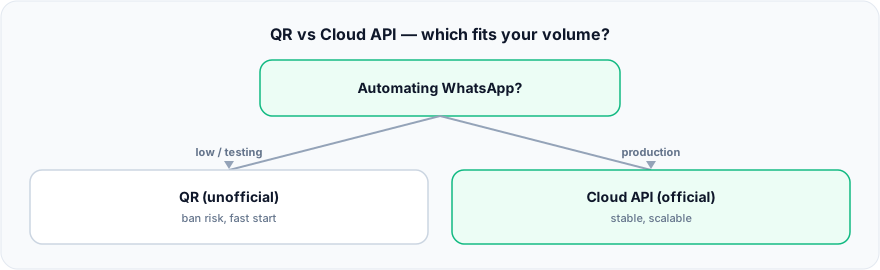
Figure: QR vs Cloud API — which fits your volume?.
What is QR-based WhatsApp automation?
QR-based automation links a normal WhatsApp account to a server the same way WhatsApp Web does — you scan a QR code, and the tool then reads and sends messages on that number’s behalf. Popular examples include the open-source Baileys library and platforms built on it such as WAHA and Evolution API.
The appeal is obvious: no business verification, no template approval, no per-message fee, and you are running in minutes. The catch is equally clear — this method is not sanctioned by Meta. It reverse-engineers the WhatsApp Web protocol, which violates WhatsApp’s terms of service, and WhatsApp’s anti-spam systems actively look for automated behavior on unofficial connections. Numbers running these tools are frequently banned, often within a few weeks of steady use — there is no published figure for how quickly, only a well-documented pattern of bans. There are no official message tiers because there is no official relationship — your only ceiling is the anti-spam layer, and hitting it means losing the number, not a rate-limit error.
What is the WhatsApp Cloud API?
The WhatsApp Cloud API is Meta’s official, cloud-hosted API for programmatic messaging. You (or a BSP partner) register a number, complete business verification, and send messages either as free-form replies inside a 24-hour customer service window or as pre-approved templates outside it. Because it is the sanctioned path, it is stable, supports a verified business profile, and does not put your number at risk of a policy ban when you follow the rules.
The trade-off is process and cost. You need business verification, outbound templates go through approval, and messaging is billed per delivered template message by category and country (Meta publishes the rates). In exchange you get predictable, published scaling limits instead of an invisible anti-spam ceiling.
What are the WhatsApp Cloud API message limits?
The Cloud API caps how many unique customers you can start conversations with in a rolling 24 hours, and it scales in tiers. According to Meta’s WhatsApp Business Platform docs:
“Messaging limits are the maximum number of unique WhatsApp user phone numbers your business can deliver messages to, outside of a customer service window, within a moving 24-hour period.”
New numbers begin restricted and climb automatically as verified sending volume grows:
- Unverified start: around 250 unique customers per 24 hours until business verification is complete.
- Tier 1: up to 2,000 unique customers / 24h. You reach it by verifying your business with Meta, having a partner verify it, or delivering 2,000 messages to unique users in 30 days with high-quality templates.
- Tier 2: up to 10,000 unique customers / 24h.
- Tier 3: up to 100,000 unique customers / 24h.
- Tier 4: unlimited.
One structural point matters in 2026: Meta states these limits are “calculated and set at the business portfolio level and are shared by all business phone numbers within a portfolio,” so multiple numbers under one portfolio share the same ceiling rather than each getting its own — Meta’s docs state limits “are calculated and set at the business portfolio level and are shared by all business phone numbers within a portfolio.”
Which one fits your volume?
Match the risk to the stakes. For a prototype, internal tool, or a handful of messages a day where a banned number would not hurt, QR tools are fine and cheap — just accept that the number can disappear. For any customer-facing production use, notifications, or growth past a few hundred conversations a day, use the Cloud API: the per-message cost is far smaller than the cost of losing your main business number and every conversation on it. And if you want templates, a verified profile, and predictable scaling, the official API is the only path that offers them.
If you are choosing the official route, Quick.Bot connects to WhatsApp through an official Cloud API / BSP partner with embedded signup, so you get the compliant path without wiring up templates and webhooks yourself.
When QR-based automation is the better choice
QR tools have a legitimate place. For a quick prototype, an internal automation on a throwaway number, a personal project, or a proof of concept you need running this afternoon, the open-source, zero-approval, zero-fee path is genuinely faster and cheaper. If losing the number would be a shrug rather than a crisis, and your volume is low enough to stay under the anti-spam radar, QR-based tools let you validate an idea before committing to business verification. The mistake is only in using them where a ban would actually cost you customers or revenue.
Two official routes: QR onboarding vs Cloud API
Everything above compares unofficial QR tools against the official platform. But “QR” also describes a legitimate onboarding step, and the difference matters when you pick how to connect. On the official path you still choose between two routes, and they are not interchangeable — the trade-off is about who keeps access to the phone.
- Official QR onboarding — coexistence. You connect your existing WhatsApp Business account by scanning a code, and the phone keeps working. Your team answers from the shared inbox while someone can still reply from the handset. Nothing migrates, and nobody loses the app they already use.
- Cloud API — no mobile access, but campaigns. Moving a number onto the Cloud API takes it out of the WhatsApp app: from then on the number lives in the platform, not on a phone. What you get in exchange is template campaigns and bulk outbound messaging, which the coexistence route does not offer.
So the real question is not “official or not” — pick official either way — but whether your team still needs the phone in their hands, or whether outbound campaigns matter more. Quick.Bot supports both routes.
Frequently asked questions
Does connecting by QR mean I lose WhatsApp on my phone?
Not on the official QR route: it is built for coexistence, so the handset keeps working alongside the shared inbox. Moving the number to the Cloud API is the one that takes it out of the app — the number then lives in the platform rather than on a phone. Choose based on whether anyone still needs to reply from the handset.
Is QR-based WhatsApp automation safe?
It is not officially safe. QR tools like Baileys, WAHA, and Evolution API reverse-engineer WhatsApp Web, which violates WhatsApp’s terms, and numbers using them can be banned by anti-spam detection, often within weeks of steady use. Use them only where a banned number would not hurt your business.
Will WhatsApp ban my number for using an unofficial API?
It can. WhatsApp’s anti-spam systems detect automated behavior on unofficial connections and ban numbers without warning. The official Cloud API does not carry this policy-ban risk when you message within the rules. If it already happened, see why WhatsApp blocked my number for the appeal and the fix.
What is the difference between the Cloud API and QR tools?
The Cloud API is Meta’s official, sanctioned product with business verification, approved templates, published message limits, and a verified profile. QR tools are unofficial, cheaper, and faster to start, but violate WhatsApp’s terms and risk a ban. The API trades setup effort and per-message fees for compliance and stability.
How many messages can I send on the WhatsApp Cloud API?
The Cloud API scales through tiers by unique customers per 24 hours: 250 to start, then 2,000, 10,000, 100,000, and unlimited. These limits are set at the business portfolio level, so all numbers in one portfolio share the ceiling. Once past 2,000, the limit rises one level within about 6 hours whenever you are sending high-quality messages and have used at least half your current limit in the previous 7 days.
Is the WhatsApp Cloud API free?
The API itself has no seat cost, but outbound template messages are billed per message by category and country, while non-template replies inside the customer service window are free — as are utility templates delivered inside an open window. QR tools have no such fees, which is part of why they are used despite the ban risk.
Can I switch from a QR tool to the Cloud API later?
Yes. Many teams prototype on a QR tool and migrate to the official Cloud API for production. Moving early avoids building your customer base on a number that could be banned. A BSP partner or a platform like Quick.Bot with embedded signup makes the official onboarding straightforward.
Conclusion
QR-based tools and the WhatsApp Cloud API solve the same problem with opposite trade-offs: QR is cheap, fast, and risky; the Cloud API is compliant, stable, and metered. Choose by stakes, not just by price — low-risk prototypes can live on QR, but anything your business depends on belongs on the official path. If you also run a team, the same official number can drive a multi-agent shared inbox on one number.
Quick.Bot builds on the official WhatsApp Cloud API through a BSP partner with embedded signup, so you get the scalable, ban-safe path plus a native flow builder and shared inbox on top.
Build on the official WhatsApp path → Quick.Bot WhatsApp bot builder