By Francisco Mastromarino, Founder, Quick.bot · September 6, 2026 · Updated September 21, 2026
WhatsApp for business, explained: templates, time windows and what each message costs
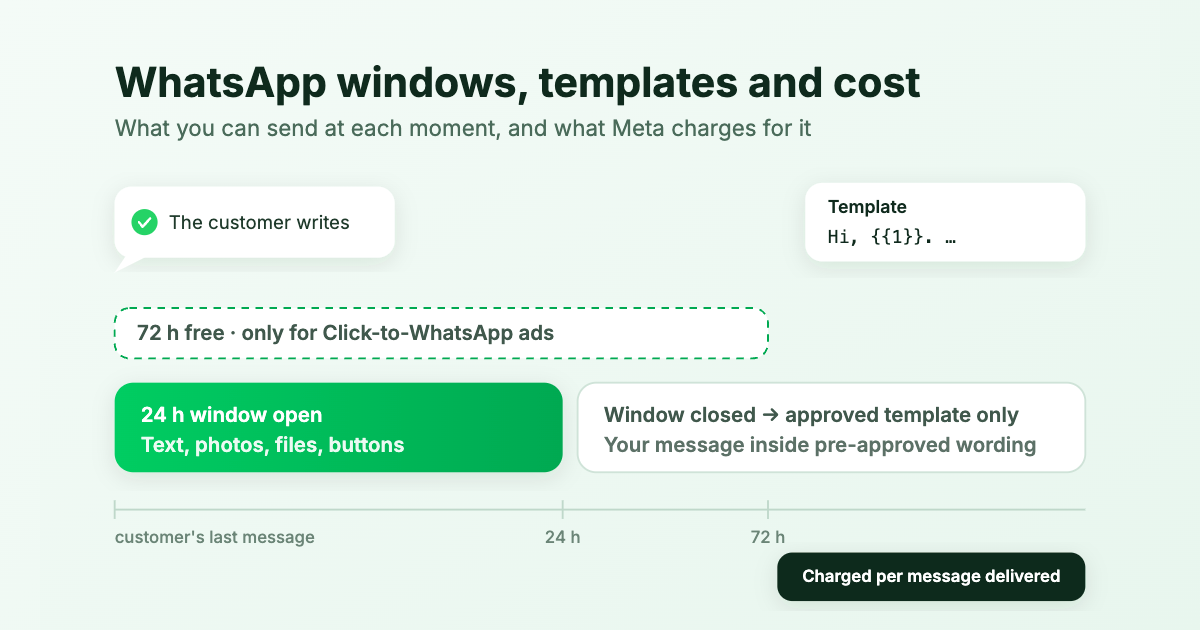
WhatsApp is not email. A business cannot message a customer whenever it wants with whatever it wants. WhatsApp decides what you are allowed to send based on time windows, and Meta decides what it costs based on the type of message and the customer's country. Most surprises with WhatsApp bots ("why was my reply not delivered?", "why was I charged for this?") come from mixing up those two things.
This guide explains the model from scratch, for business owners rather than developers: what a message template is, which time windows exist, what you can send at each moment, what Meta charges per message in your customers' countries, and how the rules change on October 1, 2026.
The one-minute version
- Will my replies reach the customer? Yes, for 24 hours after the customer's last message. After that, WhatsApp only delivers a template: a message whose wording Meta approved in advance. QuickBot prepares that template for you and warns your team when it applies.
- Who charges me, and how much? Meta, on the payment method of your WhatsApp Business Account, per message delivered. QuickBot marks each template it sends as billed or free and adds no fee of its own. The price depends on the customer's country: about 2 cents per message in Spain, under 1 cent in Brazil, 5.5 cents in Germany.
- What is free? Until September 30, 2026, every reply inside the 24-hour window. From October 1, 2026 those replies are charged too. Conversations that start from a Click-to-WhatsApp ad stay free for 72 hours.
- What do I have to do? Nothing technical. Keep a valid payment method on your WhatsApp Business Account, watch how many separate messages your bot sends per reply (each one is charged), and decide whether promotional messages are worth their higher price. From October 1, 2026 the payment method stops being optional even for a small account: an account without one spends its free service messages and then stops delivering them.
Five words you will see
- Free-form message: anything you or your bot write on the spot. Meta calls these service messages.
- Template: a message with fixed wording that Meta approved beforehand, with blanks you fill in when you send it.
- 24-hour window: the time after a customer's message during which you can send free-form messages.
- Click-to-WhatsApp ad: an ad on Facebook or Instagram whose button opens a WhatsApp chat with your business. If you do not run those ads, the 72-hour free window below never applies to you.
- WhatsApp Business Account: the account in Meta that owns your phone number, your templates and your bill. Different from the free WhatsApp Business app on a phone, which has none of these rules or costs.
What is a message template?
A template is a message you register in your WhatsApp Business Account and that Meta reviews before you ever send it. Its text is fixed, with numbered blanks. When you send it you only fill in the blanks. For example, a template registered as
Hi, {{1}}. We look forward to your reply.
sent with the blank filled as "your quote is ready, shall we go ahead?" reaches the customer as:
Hi, your quote is ready, shall we go ahead?. We look forward to your reply.
What matters in practice:
- Meta reviews every template. After you create or edit one it is pending until Meta approves it. It is usually fast, but Meta says review can take up to 24 hours. Only approved templates can be sent.
- Meta can reject it (wrong category, promotional wording in a template declared as something else) and can pause it later if customers block or report it or rarely read it: 3 hours the first time, 6 hours the second, disabled the third.
- The wording has rules. A blank cannot be the whole message and cannot open or close it, the fixed text must be a reasonable share of the message, each blank needs an example value for the review, values cannot contain line breaks, and the whole message is capped at 1,024 characters.
- Templates belong to the account, not the number: two numbers of the same account share them. Editing the text sends the template back to review.
- You do not have to create one for the inbox. QuickBot registers a template for each bot and keeps it in sync with Meta; you can edit its wording in the bot's WhatsApp settings.
Meta's reference: message templates.
Template categories
When you create a template you give it a category. Meta checks that the category matches the content, re-checks approved templates periodically, and the category decides the price.
| Category | What it is | Examples |
|---|---|---|
| Utility | About something the customer asked for or a transaction in progress | Appointment reminder, order update, "your quote is ready" |
| Marketing | Promotions and anything not tied to a request | Offers, news, a generic "are you still interested?" |
| Authentication | One-time codes | Login or verification codes |
| Service | Not a template: any free-form message | Your bot or your team replying inside the 24-hour window |
The line between utility and marketing is Meta's, not yours: a template that reads like a promotion is moved to marketing (the expensive category) even if you declared it as utility. Keep your follow-ups about the customer's actual request. Marketing templates also need the customer's prior opt-in, are capped per customer across all businesses, and are not delivered to United States (+1) numbers.
The time windows
Three clocks run on every conversation. The first two are Meta's rules and apply to every provider; the third is how QuickBot keeps a conversation open in your inbox.
1. The 24-hour window
What opens it: a message from the customer. Every new customer message restarts the 24 hours. Your own messages never extend it.
What it allows: while it is open you can send free-form messages: text, photos, documents, audio, buttons, lists, whatever your bot or your team produces.
What happens when it closes: WhatsApp stops delivering free-form messages. The only thing that gets through is an approved template. No plan or budget changes this: it is a rule about what can be delivered, not about money.
2. The 72-hour free window (ads only)
What opens it: a customer who writes to you from a Click-to-WhatsApp ad or a Facebook Page button, using the WhatsApp app on their phone (Android or iOS), and your business replying within 24 hours. The 72 hours start when that reply is delivered.
What it allows: for 72 hours every message you send to that customer is free, templates included. It does not change what you can send, only the price.
The two windows are independent. Think of them as two questions: "can I send free text?" (24-hour window) and "is it free?" (72-hour window). A customer who came from an ad and went quiet for 30 hours is a "no" to the first and a "yes" to the second: templates only, but free.
3. The 7-day conversation in QuickBot
Meta does not say when a conversation ends. QuickBot does: a WhatsApp conversation stays open in your inbox for seven days after the customer's last message, so your team can still see it and reach out with the template. After seven days it closes; the customer's next message starts a new one. This is a QuickBot setting, not a Meta rule.
What can I send, and when?
| Within 24 h of the customer's last message | More than 24 h later | |
|---|---|---|
| Free-form text | Yes | No, not delivered |
| Photos, documents, audio | Yes | No, not delivered |
| Buttons and lists | Yes | No, not delivered |
| Approved template | Yes | Yes |
| Pending, rejected or paused template | No | No |
A message you start, like an appointment reminder sent the day before, always falls in the right-hand column: the customer has not written recently, so it must be a template (a utility one, charged).
A week in the life of one conversation
A patient clicks your ad on Monday at 10:00 and asks for an appointment.
| When | What happens | What you can send, and what it costs |
|---|---|---|
| Mon 10:00 | Patient writes from the ad | Anything, for 24 hours |
| Mon 10:05 | Bot answers with available slots | Free-form. Because you replied within 24 h to an ad contact, the next 72 hours are free |
| Tue 10:01 | Patient has not answered for 24 h | Templates only (still free until Thursday 10:05) |
| Wed 16:00 | Receptionist sends the template: "your slot is still available, shall we confirm?" | Delivered, free (72-hour window open) |
| Wed 16:20 | Patient answers | Anything again, until Thursday 16:20 |
| Fri 11:00 | Receptionist sends another template | Delivered, charged (72-hour window expired Thursday) |
| Wed 16:20 + 7 days | Still no reply | QuickBot closes the conversation in the inbox |
What each message costs
Meta charges per message delivered (a message that never reaches the phone is not charged), at a price set by the category and the customer's country. Each rule below carries the date it applies from, so you can tell where you stand.
| Message | Charged? |
|---|---|
| Free-form reply inside the 24-hour window (bot or human) | Free until Sep 30, 2026 · charged at the utility price from Oct 1, 2026 |
| Utility template inside the 24-hour window | Free until Sep 30, 2026 · charged from Oct 1, 2026 |
| Utility template outside the window (reminders, follow-ups) | Always charged |
| Marketing template | Always charged |
| Authentication template | Always charged |
| Anything inside the 72-hour free window (ads) | Free |
In Meta's words: "Effective October 1, 2026, Meta will charge for service messages, which have not been charged since November 2024" and "Meta will charge for utility messages sent in response to users within an open 24-hour customer service window" (source). The windows themselves do not change: outside 24 hours you still need a template, inside it you can still send anything. Only the price moves.
From October 1, 2026 every business phone number gets 1,000 free service messages a month: Meta charges from the 1,001st delivered service message onward. The allowance resets every month, does not roll over, and is counted per phone number, so a business with five numbers gets five allowances. This is a new tier under per-message pricing, not the old conversation-based free tier, which became unlimited in November 2024. Past the allowance, an account with no valid payment method does not get billed later: Meta simply stops delivering its service messages until one is added. Rates themselves move on a published schedule: Meta’s pricing calendar commits to changing prices only on the first day of a quarter, at most four times a year, with at least one month of notice for a rate card update and six months for a change to the pricing model itself.
Prices per country
Meta publishes the list price per delivered message for every market, in 16 currencies, on its official pricing page, including the rate card that takes effect on October 1, 2026, published alongside the one in force today. We link to it rather than copy it here: Meta revises these a few times a year, and a table in a blog post goes stale without anyone noticing.
What is worth knowing without opening it: the price follows the customer's phone country, not yours. Free-form replies are charged at that market's utility price. Marketing costs several times more than utility in most markets. Authentication codes usually match utility, but some markets, India among them, charge more for codes sent to a number abroad. And your account may be billed in ARS, BRL, EUR, MXN or another supported currency, in which case that list applies and the numbers differ slightly.
Meta's pricing page and rate cards
Volume discounts: utility and authentication templates get cheaper as your monthly volume grows (5% off above the first tier, up to 25% off), counted across all the WhatsApp Business Accounts of the same company. In Argentina, for example, the utility price drops from 2.6 cents to 2.47 above 100,000 messages a month. Free-form replies get no discount: their price is flat.
What a month looks like: a dental clinic in Spain
300 patients a month. Each one writes, the bot answers with three separate messages, a receptionist adds one reply; the clinic also sends 300 appointment reminders the day before (a utility template, since the patient has not written recently) and one promotion a month to everyone. The figures below use Spain's rates as of July 2026 (2 cents for utility and free-form, 7.07 cents for marketing) to make the shape of the bill visible. Check the current rate for your market before using them.
| Messages | Until Sep 30, 2026 | From Oct 1, 2026 |
|---|---|---|
| 900 bot replies + 300 receptionist replies (inside the window) | $0 | 1,200 × $0.02 = $24 |
| 300 appointment reminders (utility template) | 300 × $0.02 = $6 | $6 |
| 300 promotions (marketing template) | 300 × $0.0707 = $21.21 | $21.21 |
| Total | $27.21 | $51.21 |
Two things stand out. The promotion costs almost as much as everything else together. And the bot's three-message replies become the biggest line: folding that answer into a single message would bring those 900 sends down to 300, and the line from $24 to $12.
What this means in the QuickBot inbox
- Inside the 24-hour window nothing changes for your team. Bot and agents reply as usual; each delivered message is charged at the utility price of the customer's country.
- When the window has closed, the composer tells you. An alert appears under the text box, your agent types normally, and before sending QuickBot shows the exact text the customer will receive (their words wrapped in the bot's template) and whether it is free (ad window still open) or charged. One click to confirm. The message in the thread shows what was delivered, marked as billed or free.
- Photos, files and audio wait. Meta templates can carry an image or a document but never audio, and QuickBot's template is text-only; outside the window those buttons are blocked until the customer writes again.
- Keep the template about the customer's request. The wording QuickBot ships is meant to continue an open conversation. If you rewrite it into a promotion, Meta may reclassify it as marketing at the higher price.
- The conversation stays in the inbox for seven days after the customer's last message, so the team can pick it up again with the template.
Five ways to keep the bill down
- Reply within 24 hours whenever you can: free text, no template, no friction.
- Merge the bot's consecutive short messages into one when the content allows it: each delivered message is charged.
- Keep reminders and follow-ups as utility templates about the customer's request; marketing costs 3 to 10 times more.
- If you advertise, use Click-to-WhatsApp ads and reply within 24 hours: the next 72 hours are free.
- Watch which sends QuickBot marks as billed in the thread, price them with the table above, and compare that with what the conversation brought you.
Sources
- Pricing on the WhatsApp Business Platform (Meta), including the downloadable price lists per currency, the pricing calendar and the running log of rate changes per market.
- Service messages pricing (Meta), the October 1, 2026 announcement.
- Message templates and template categories (Meta).
Rules and prices are Meta's and change from time to time; check the sources above before making a decision that depends on an exact figure. Want your WhatsApp bot and team inbox in one place? See the QuickBot WhatsApp bot builder.