By Francisco Mastromarino, Founder, Quick.bot · July 23, 2026
“Typebot Is Disabled” on Evolution API: Causes and Fix
Key takeaways
- “Typebot is disabled” on Evolution API almost always means the bot exists but is not eligible to run for this message — not a crash.
- The 5 usual causes are: the bot’s
enabledflag is off, the trigger does not match the text, a session is already open, the Typebot URL/publicId points at an unpublished flow, or Evolution API and Typebot versions are misaligned. - Per the Evolution API docs, the bot’s
enabledparameter “Activates (true) or deactivates (false) the bot” — check it first, before anything else. - Most cases resolve by walking those five checks in order; this is a support-first fix, not a product pitch.
- Evolution API is an open-source WhatsApp API gateway; Typebot is the open-source conversational builder it calls — self-hosting both means you own the compatibility matrix.
Most common causes at a glance
| Cause | What you’ll see | Fix |
|---|---|---|
Bot enabled: false | Bot ignored entirely | Set the bot to enabled |
| Trigger mismatch | Only some messages start it | Check triggerType / triggerValue |
| Session already open | First message worked, rest don’t route | Review session + keep-open setting |
| Wrong URL / unpublished flow | 4xx from Typebot, nothing starts | Verify public URL + publicId, publish the flow |
| Version mismatch | Intermittent breakage after update | Align Evolution API + Typebot versions |
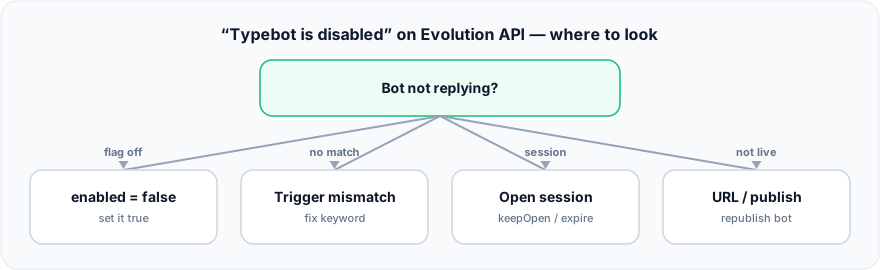
Figure: “Typebot is disabled” on Evolution API — where to look.
What does “Typebot is disabled” actually mean on Evolution API?
It means no eligible bot matched the incoming message, so the integration did nothing — it is a routing decision, not usually a crash. Evolution API stores each Typebot integration as a bot with its own settings: an enabled flag, a trigger, and the target Typebot URL. When Evolution receives a WhatsApp message, it decides whether any bot should handle it. If none is eligible, the integration is effectively “disabled” for that message. Walk the checklist below in order.
Fix 1 — Is the bot enabled?
Start with the obvious: the bot’s enabled flag. According to the Evolution API documentation, the enabled parameter “Activates (true) or deactivates (false) the bot.” A bot saved with enabled: false — or a global Typebot setting toggled off — will never run. Re-check the bot’s settings and the default settings, save, and (if your setup requires it) restart the instance so the change takes effect.
Fix 2 — Does the trigger match?
If the bot is enabled but only some messages start it, the trigger is the suspect. Evolution’s trigger has a triggerType (keyword, all, or none), a triggerOperator (contains, equals, startsWith, endsWith, regex), and a triggerValue. A common trap: triggerType: keyword with a triggerValue that does not match what users actually type, so nothing fires. For a catch-all bot, use triggerType: all. Double-check the operator too — equals is strict, contains is forgiving.
Fix 3 — Is a session already open?
If the first message worked but later ones do not route as expected, an existing session may be holding the conversation. The flow can stay open at the end unless closed, and this behavior is influenced by the keep-open (keepOpen) and expire settings. Inspect the open sessions for that contact, close a stuck one, and confirm your keep-open and expire configuration matches how you want conversations to end and restart.
Fix 4 — Is the Typebot URL right and the flow published?
Evolution calls your Typebot instance by URL and public ID. If the flow is not published, or the URL/publicId is wrong, or your self-hosted Typebot is unreachable from the Evolution host, the start call fails and nothing runs. Verify the public URL resolves, the flow is published, and the two services can actually reach each other over the network.
Fix 5 — Are your versions aligned?
Typebot integration in Evolution API has changed across releases, and mismatched versions cause intermittent, hard-to-explain breakage — including sessions that respond for a while and then stop. If the integration broke right after an upgrade on either side, check the changelog and align Evolution API and Typebot to a known-good pairing. Self-hosting both means you own this compatibility matrix.
When staying on Evolution API + Typebot is the right call
To be fair, this stack is popular for good reasons. It is open source end to end, it runs on infrastructure you control, and it is highly customizable — you can shape the trigger logic, host it anywhere, and pay no per-seat fee. If you have the DevOps capacity to own the session model and version compatibility, and you specifically want a QR-based, self-hosted setup, this combination is a legitimate and flexible choice. The trade-off is that you are the one on call when a trigger or session bug appears.
Once the five fixes above have your bot responding again, only then is it worth asking whether you want to keep owning this maintenance. If trigger quirks, session state and version drift have become their own job, a managed platform that runs the WhatsApp connection and bot engine for you removes that load — Quick.Bot is one such option, on the official WhatsApp Cloud API path. For the fuller trade-off, see the self-hosted cost checklist and the WhatsApp bot builder. Worth knowing before you invest more time here: Evolution API drives the number over an unofficial QR connection, which is itself the most common reason WhatsApp blocks a business number.
Frequently asked questions
Why does Evolution API say “Typebot is disabled”?
Because no enabled bot matched the incoming message. The bot may have enabled: false, the trigger may not match the text, a session may already be open, or the Typebot URL/flow may be wrong or unpublished. Work through those in order.
My Typebot worked once, then stopped responding. Why?
This is usually a session issue: a session left open holds the conversation, so new messages don’t start a fresh flow. Review open sessions and your keep-open (keepOpen) and expire settings. Version mismatches between Evolution API and Typebot can also cause “responds for a few minutes then stops” behavior.
How do I make a Typebot trigger on every message in Evolution API?
Set the bot’s triggerType to all instead of keyword. With keyword, only messages matching the triggerValue under the chosen operator will start the bot.
Do I need to restart the Evolution API instance after changing bot settings?
Sometimes. If a saved change to enabled, triggers or defaults doesn’t take effect, restart the instance and test again to rule out a stale state.
Does “Typebot is disabled” mean my Typebot server is down?
Not necessarily. It usually means Evolution API chose not to route the message to a bot. A genuinely unreachable Typebot URL shows up as a failed start call (Fix 4), which is a different symptom from the routing “disabled” message.
Is there an alternative that avoids this maintenance entirely?
Yes. A managed WhatsApp bot platform runs the bot engine and the WhatsApp connection for you, so there is no Evolution API session model or version matrix to babysit. Quick.Bot is one such option, using the official WhatsApp Cloud API path.
Conclusion
“Typebot is disabled” on Evolution API is almost always a configuration or session-state issue, not a dead end. Check the enabled flag, then the trigger, then open sessions, then the URL/publish state, then version alignment — most cases resolve in one of those five steps.
If you love the control of the open-source stack, keep it. But if you are tired of maintaining Typebot + Evolution API and want the WhatsApp connection, bot engine and a shared inbox handled for you, Quick.Bot is a managed alternative worth a look — after your bot is running again.
Tired of babysitting the stack? See the managed alternative →