By Francisco Mastromarino, Founder, Quick.bot · July 21, 2026
Typebot on a VPS vs Managed Cloud: What Does Each Really Cost?
Key takeaways
- Running Typebot on a VPS looks cheaper because you only see the server bill — the real cost also adds object storage, email, backups, uptime and engineering hours.
- Typebot’s own docs say the operator must “get a server and manage your infrastructure,” which is the line the VPS quote hides.
- At low volume (~1,000 conversations/month) a VPS usually wins on dollar cost; by ~20,000/month, managed cloud usually wins on total cost of ownership because operational load, not compute, is what scales.
- The comparison spans 3 volume tiers (1K, 5K, 20K conversations/month); all live prices below use a named reference stack with public prices (verified August 2026); swap in your own provider before budgeting.
- Quick.Bot is a managed alternative that includes the infrastructure plus a native shared inbox, so there is no server, backup routine or on-call rotation to own.
Cost comparison at a glance
| Cost driver | Typebot on a VPS | Managed cloud (e.g. Quick.Bot) |
|---|---|---|
| Server / compute | ⚠️ You pay, and you scale it | ✅ Included, scales for you |
| Object storage | ⚠️ S3/MinIO extra | ✅ Included |
| Transactional email | ⚠️ Separate provider | ✅ Included |
| Backups + restore testing | ⚠️ Your time | ✅ Managed |
| Uptime / on-call | ⚠️ You are on-call | ✅ Handled for you |
| Updates & patches | ⚠️ Recurring hours | ✅ Automatic |
| Shared inbox + handoff | ❌ Add a second stack | ✅ Native |
| Predictability of bill | ⚠️ Variable | ✅ Flat plan |
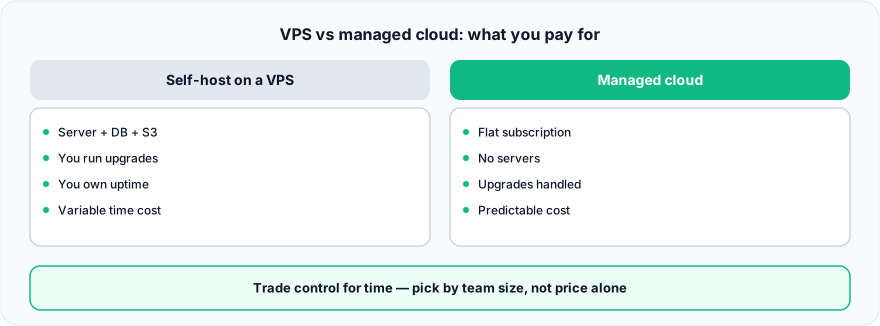
Figure: VPS vs managed cloud: what you pay for.
What is the difference between a Typebot VPS and managed cloud?
A VPS gives you a raw server you self-manage; managed cloud gives you a running product someone else operates. Typebot is an open-source conversational builder you can self-host on a VPS, where you own every layer. Managed cloud folds compute, storage, email, backups and uptime into one plan. Typebot’s self-hosting docs are blunt about which side the VPS falls on:
“You need to get a server and you need to manage your infrastructure.”
That one line is the entire hidden cost — everything after “manage” is time the server bill never shows.
The math, not the opinion
The honest way to compare is to count every line item at your real volume, then add the one nobody invoices you for: time. Let’s walk three conversation tiers. Use the reference stack below with quotes from your own providers — never trust a made-up number in a budget.
At ~1,000 conversations/month
At low volume a small VPS handles the load, and the raw server bill is the cheapest option on the table. On the serverless path Typebot’s docs support, that floor is Vercel Pro at $20/user/month — the free Hobby tier is not licensed for commercial use. But you still add object storage and an email provider, and you still spend setup time on TLS, backups and the initial deploy. The dollar cost is low; the time cost is front-loaded. For a hobby project or a single flow, VPS often wins here.
At ~5,000 conversations/month
Now concurrency matters. Media uploads grow your storage bill, sessions consume more memory, and you likely size up compute. On Vercel that shows up as usage overage past the $20 credit ($0.15/GB transfer, $0.128/hour active CPU); on a VPS it means a bigger instance. Backups become non-negotiable, and updates start to feel like a chore because downtime now affects real customers. This is the tier where managed cloud’s flat, all-inclusive price starts to look competitive once you price your own hours honestly.
At ~20,000 conversations/month
At this volume you are effectively running production infrastructure. You may need a bigger or second server, a real backup and monitoring routine, and someone who can respond to an incident. At this size Neon’s pay-as-you-go compute ($0.106/CU-hour) and storage ($0.35/GB-month) stop being rounding errors. The server bill is still only part of the story — the dominant cost is engineering time and the risk of downtime during a sale. Managed cloud usually wins here on total cost of ownership, because the operational load, not the compute, is what scales.
Why is the VPS bill misleading?
Because a VPS quote shows only compute and bandwidth, not the four production line items stacked on top. It does not show:
- Object storage for images and file uploads (S3 or self-run MinIO).
- Email delivery for login and notifications (a separate provider).
- Backups — scheduling them, testing restores, storing them off-box.
- Uptime — you are the on-call engineer, nights and weekends included.
- Updates — reading release notes, testing, and rolling forward safely.
None of these are optional in production, and together they often exceed the server line itself. For a full itemized list, see the self-hosted cost checklist.
Mid-article aside: the moment “keeping it up” costs more of your week than “building bots,” the flat, managed price stops being an expense and starts being a time refund — that is the whole pitch for managed cloud like Quick.Bot.
The layer the VPS math forgets
Both a VPS and a plain managed Typebot give you a bot builder. Neither, on its own, gives you a place for human agents to take over a live conversation. Self-hosting that shared-inbox layer means a second service to deploy, secure and back up. Managed platforms that include the inbox natively remove that entire second stack from the comparison — which is why total cost of ownership, not the server price, is the number that actually matters.
When the VPS is the better choice
Self-hosting on a VPS is the right call when you have low, predictable volume and want the cheapest possible dollar cost; when compliance requires full control over where data lives; or when you already run mature DevOps and one more container is trivial to operate. Developers who want to customize or extend Typebot’s open-source code also belong here. In those cases the control is worth the operational hours.
Frequently asked questions
Is running Typebot on a VPS cheaper than managed cloud?
On the server bill alone, often yes at low volume. On total cost of ownership — storage, email, backups, uptime and engineering time — the gap narrows fast and usually reverses as volume grows.
What hidden costs does a Typebot VPS have?
Object storage, transactional email, backups and restore testing, TLS and uptime, and the recurring hours to apply updates and handle incidents. The server quote shows none of these.
At what volume should I move from a VPS to managed cloud?
There’s no universal number, but the crossover typically appears when downtime starts affecting paying customers and update/maintenance time becomes a real weekly cost — often in the mid-thousands of conversations per month.
Does managed cloud include a shared inbox?
It can. Quick.Bot’s managed plan includes a native shared inbox with agent assignment and human handoff, which self-hosting Typebot on a VPS does not provide out of the box.
How do I estimate my own Typebot VPS cost?
List every line item — compute, storage, email, backups — get real quotes for each ( the reference prices above), then add an honest estimate of monthly engineering hours at your hourly cost. That last number is what most VPS budgets leave out.
Do I still need object storage and SMTP on a Typebot VPS?
Yes. File/image uploads need S3-compatible object storage and login/notification emails need SMTP, regardless of VPS size. Both are separate bills or separate services you operate on top of the server.
Conclusion
Typebot on a VPS is genuinely cheaper at low volume and gives you full control — a great fit for hobby projects, strict compliance, or teams with real DevOps depth. But the server bill is not the total cost. Storage, email, backups, uptime and update time all stack on top, and they scale with your success.
If you would rather pay one predictable price and never touch a server, Quick.Bot is a managed alternative with the builder, native shared inbox, handoff and analytics included. See the WhatsApp bot builder.
No servers to maintain — try Quick.Bot free →